All Stories

Thursday, December 31, 2020

When you upload a template, sometimes you can see posted dates of blog posts showing as "undefined". This is not a error in the template. To fix this problem you need to change "Timestamp Format" of your blog.

Posted Date Undefined Error in Blogger

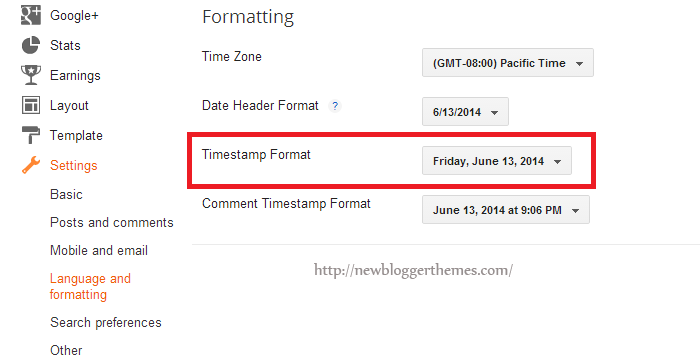
First go to your blog "Settings" --> "Language and formatting".

Select "Timestamp Format" from drop-down menu similar to "Friday, June 13, 2014" format.

Important: You need to change "Timestamp Format". Not "Comment Timestamp Format".

Timestamp Format in Blogger

Click on "Save settings" button and you are done.

How to Fix Posted Date Undefined Error in Blogger

When you upload a template, sometimes you can see posted dates of blog posts showing as "undefined". This is not a error in the template. To fix this problem you need to change "Timestamp Format" of your blog.

Posted Date Undefined Error in Blogger

First go to your blog "Settings" --> "Language and formatting".

Select "Timestamp Format" from drop-down menu similar to "Friday, June 13, 2014" format.

Important: You need to change "Timestamp Format". Not "Comment Timestamp Format".

Timestamp Format in Blogger

Click on "Save settings" button and you are done.

Posted at December 31, 2020 |  by Online Ustaad

Thursday, December 24, 2020

Are you wondering how to create a Blogger account? Many of us do, because Blogger is one of the most popular blogging platforms out there and it can provide us with an extraordinary, fun way to express ourselves in the online world. Not only is it Blogger a very large blogging website, but it's also full of categories that you can blog on. You have complete control over what you want to blog, and that does make Blogger an amazing platform to begin with. Yet you do have to wonder how to create a blog on Blogger! We are here to help you understand all of that and so much more as fast as possible, thanks to a detailed guide that will showcase all the necessary instructions in a very easy to read manner.

how to create blogger account

Creating a Google account

What you need to know here is that Google owns Blogger, and because of that you will need to use a Google account to sign in to this platform. You can create a Google account now and then you will be able to continue to the platform without a problem. By creating a Google Account you will be able to access a wide range of Google apps and services like Drive or Mail for example. Visit the page above and share all the necessary information in order to create the necessary Google Account. Thankfully, the process is very easy and it will take only a few minutes of your time. In case you already have a Google Account, you will need to sign on the Blogger page.

create a google account

Creating your blog

Once you are located on the Blogger page, you will need to press the New Blog button in order to start a blog. You will receive a new window where you will learn how to create a Blogger account. This will enable you to share all the necessary information.
  • Make sure that you add a title for your blog in the Title area. This is very important because it will allow you to entice the visitor to read more about you and your content. So, try to make the title relevant and appealing
  • In order for users to find your blog, you will need to create an Address for it. Your blog will have a blogspot.com address, but you will need to choose what goes before blogspot.com. Basically, you can opt for something like abcdef.blogspot.com or anything like that. Remember that this can be modified in the long run. The great thing here is that you will immediately be able to see if that address is available or not. This means you will have the ability to check the address availability really fast.
  • The next step will require you to choose from any of the presets that are available at this point. Starting with a Template is a good idea, but do remember that this can be modified afterwards as well. So it's a good idea to just pick a template and move onward.
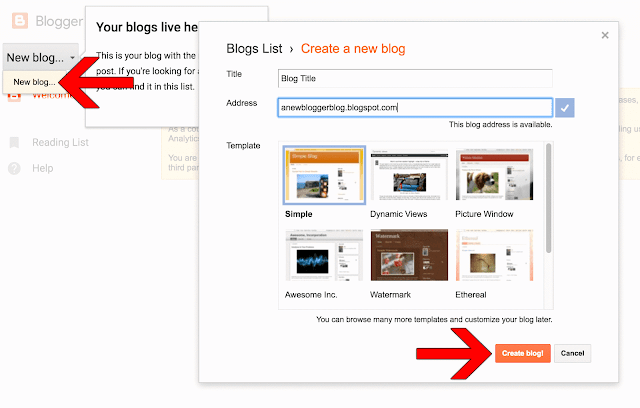
create a blogger account

Once you have the blog title, address and template ready to go, you will have to press the Create blog! button. This process will take a little bit until it's completed properly, so just wait for a few seconds as the new blog will soon be added to the blog list. So, if you were wondering how to create a blog on Blogger, this is the simplest way to do it.

Maybe the best thing about how to create a Blogger account is that the entire process is very easy to do. Even beginners will have no problem creating and setting up an account. The customization options are plentiful here, so you shouldn't have any problem setting your account really fast!

Although the blog address will be available, you can't call that a blog unless you start writing content in there. Obviously, you will need to learn how to write a post on Blogger, and we are here to help you with that right now.

In order to start writing, you will need to click the Create a new post link or you can press the New Post button. Once you do that, you will gain immediate access to the post editor and here you can write the blog as well as make any necessary changes to content that you already wrote.

create new blogger post

Write a title for your post

Your post needs to have a title. Towards the top of the Blogger editor you will see that there is a Post title box. Add in the desired post title there. This shouldn't eat up a lot of your time, just try to come up with a post title that is enticing, very easy to use and a delight to read for your audience. A catchy title can be great. Don't opt for the clickbait title that you can see nowadays, make your title feel informative and fun to read as that's what you want. If you want to write a first post, you need to make it introductory. Write about the goals you have, the type of content you want to add and so on. It will not be easy to write down the first words, but if you create a good title it will be easier for you to translate thoughts into words!

create blogger post title

Start the writing process

You can create a Blogger post in 2 ways. You can either write the post in HTML or you can use the word processor included here. You have a button located in the top left corner which helps you switch between any of these two writing models. The HTML editor helps you create better web content and you can also use it to insert some special web functions. On the other hand, the word processor is more than qualified to offer you all the extra help you might need here.

blogger post compose html

Customizing text

If you want, you will be able to customize the text you want without a problem. You will have the ability to use the toolbar located on top of the editor to modify the text as you see fit. This includes formatting, color, size, alignment and so on. You have a Normal drop-down that helps you change the type of content you want to add, so you should consider changing between the desired heading type as you see fit. This also changes the way search engines process your content, so keep that in mind.  If possible, try to break the content into easy to read pieces. Use the Headings in a strategic manner.

blogger post heading

Add an image to your post

If you want to make your blog post enticing, you should try to add at least an image. These images make posts a lot easier to read and it's a good idea to make the most out of images if you want to share a great experience for your audience. You will have an "Insert Image" button right above your text editor, on the toolbar. There are multiple options, you can either upload them from your PC/Mac, you can share a link or you can use your webcam to take a picture if you want. However, if you link to other websites, make sure that you showcase their copyright or just refrain from doing that to begin with. There are many sites who do not agree with the idea of having their content stolen, so try to stay away from that!

insert image in Blogger post

Modify the post settings

If you look on the right side of your Post Editor, you will be able to access some Post settings. Remember that these make it easy for you to customize your post right before you choose to publish it!

blogger post settings
  • Labels are useful if you want to group multiple posts which are very similar to one another.
  • Schedule allows you to publish your content at a later date. It can come in handy if you don't want to share multiple articles at the same time.
  • Permalink is an option that allows you to select the way your post will be linked to in the future. Usually it will maintain the title structure, but there are other link types you can choose from as well.
  • Location enables you to add a location tag for your post. It's a very good tool for those that move/travel often
  • Options allows you to modify some features like the user ability to comment on a post for example. You can also choose the way your HTML code is interpreted here as well.

Previewing

A great thing about previewing your post is that you will be able to see how it looks when a reader will access it. This is the right time when you need to check your post for any errors, be it grammar or structural ones.

preview blogger post

Save the post for later

This is not the same as scheduling. When you save the post for later, it means that the post just isn't finished at this time and you will continue to work on it at a later time. You can see this as a draft for your future post.

save blogger post

Publishing the post

If you double or triple checked the post and there are no errors, then you are good to go. Still, it's a good idea to go through it at least one more time to ensure that all the content you want is there and you don't have to make any more changes. Add all the necessary labels and tags, make sure that you inserted any links, images and other information that you might need.

Once everything is ready, you will just have to press the Publish button located at the top of the panel. This is when Blogger will automatically redirect you to the Posts page. Here you will see the post right on top.

publish blogger post


Don't believe that your work is done at this point. In fact, it's far from that. You still have a long way to go before you properly optimize and improve your blog. After all, people won't be drawn in to your blog if you have just a single one to begin with. Work hard to write great posts as they will be able to make your blog stand out in the long haul.

Of course, you do need patience. Writing a good blog does require time and you shouldn't rush the content creation. Prioritize quality over quantity all the time. If you don't do that, the experience will be very well worth it in the end.

How can you expand your blog?

As we mentioned earlier, writing a single post is great but it won't draw in a lot of traffic. If you want to write a good post, one that will bring in lots of readers and views, you want to post as often as possible.

Quality content will always bring in traffic. Update the blog as often as you can. If you can share at least a post per week, you should do that. A good stream of posts will always come in handy, so make sure that you always write some good, enticing content that will help populate your blog.

If possible, we recommend you to create a post Schedule as this will help you better optimize the way you post. This way you will be able to prepare your content beforehand, so you can have it ready when you want to create a new post. The best approach is to write more than 1 post at a time. One can be posted and the others can be kept for a later date if you so desire.

create blogger posts

Write for a niche

Generalized content works but it won't really deliver good results for your audience. If you want to get the best results, we recommend you to find a niche as fast as possible. Not only does a niche help you target specific users, but it will also help you become an authority on that topic. We recommend you to research a niche and become an expert on it. This is the best way to create a large audience for a niche and from here to reaching success in blogging will be just a small step.

Don't rush the content creation process, especially if you write for a niche. Creating redundant content will just keep people away. As long as you take your time and focus on results for your audience, the experience will be an amazing one. Of course, use the proper content structure in order to cater to the needs of search engines, all while maintaining the content relevant for humans as well!

Reader interaction

Once you learn how to create a blog on Blogger you can create more than a blog in order to reach multiple audiences. But the idea here still remains, you will need to interact with the audience. The community will grow more and more as you put out content, so make sure that you always interact with the audience.

Read the comments and moderate them, make sure that you remove spam. Also, reply to people that are interested in what you write. This will help create and nurture a community around your content, which can be very interesting to do!

blogger comments

Advertising your blog

Your blog will need advertising if you want it to grow really fast. One of the best ways you can do that is by sharing it with people anywhere you can. From social networks to social media or any other location, all of these are great places where you can share your blog. We recommend you to try and do the following:
  • Post a short headline and a link to your article on Twitter
  • Single Blogger is a Google Product, make sure that you use the Google buttons in order to share on Google Plus and perform other similar actions.
  • Encourage readers and friends to share your Blogger posts on Facebook and anywhere they can. This will help you reach a large audience really fast.
  • Make sure that you comment on forums and other blogs. Link to your post there if it's meaningful for that particular topic. This type of practice is called backlinking and it's very good for SEO.

Place ads

Ads are very important if you want to monetize the blog. You won't be able to monetize your blog with AdSense unless you have a blog active for around 6 months, so keep that in mind. You also need to have at least 18 years of age and you also have to obey the TOS. AdSense allows you to receive payments based on the amount of impressions generated by your blog.

sign up for AdSense

Blog customization

You can modify just about anything you want on Blogger, it all comes down to you to make the right changes! For example, you will be able to press Layout and then you can modify the block content for each section of your blog. You also have the ability to Add a Gadget if you want. Blogger has lots of add-ons to choose from, all of which can help you better define your blog!

If you want to customize your Template, keep in mind that there are multiple customization options to choose from. You can also keep the template you have now. Programmers can press the Edit HTML button so they can modify the CSS and HTML code.

blogger template edit HTML

Stat tracking

Blogger has a dedicated option named Stats where you have the ability to monitor the blog performance. Here you have the ability to see the amount of views you get. This way you can identify what posts are performing better than others. As a result, you know what content works great for your audience in the longer term!

Learning how to create a Blogger account is really easy and you can feel free to create multiple blogs if you want. Just make sure that you write content for all of them. Plus, you can also monetize each one of your blogs if you so desire. Take your time and make sure that you provide valid information for your readers. This should be the main reason to create a Blogger account in the first place!

How to Create a Blogger Account?

Are you wondering how to create a Blogger account? Many of us do, because Blogger is one of the most popular blogging platforms out there and it can provide us with an extraordinary, fun way to express ourselves in the online world. Not only is it Blogger a very large blogging website, but it's also full of categories that you can blog on. You have complete control over what you want to blog, and that does make Blogger an amazing platform to begin with. Yet you do have to wonder how to create a blog on Blogger! We are here to help you understand all of that and so much more as fast as possible, thanks to a detailed guide that will showcase all the necessary instructions in a very easy to read manner.

how to create blogger account

Creating a Google account

What you need to know here is that Google owns Blogger, and because of that you will need to use a Google account to sign in to this platform. You can create a Google account now and then you will be able to continue to the platform without a problem. By creating a Google Account you will be able to access a wide range of Google apps and services like Drive or Mail for example. Visit the page above and share all the necessary information in order to create the necessary Google Account. Thankfully, the process is very easy and it will take only a few minutes of your time. In case you already have a Google Account, you will need to sign on the Blogger page.

create a google account

Creating your blog

Once you are located on the Blogger page, you will need to press the New Blog button in order to start a blog. You will receive a new window where you will learn how to create a Blogger account. This will enable you to share all the necessary information.
  • Make sure that you add a title for your blog in the Title area. This is very important because it will allow you to entice the visitor to read more about you and your content. So, try to make the title relevant and appealing
  • In order for users to find your blog, you will need to create an Address for it. Your blog will have a blogspot.com address, but you will need to choose what goes before blogspot.com. Basically, you can opt for something like abcdef.blogspot.com or anything like that. Remember that this can be modified in the long run. The great thing here is that you will immediately be able to see if that address is available or not. This means you will have the ability to check the address availability really fast.
  • The next step will require you to choose from any of the presets that are available at this point. Starting with a Template is a good idea, but do remember that this can be modified afterwards as well. So it's a good idea to just pick a template and move onward.
create a blogger account

Once you have the blog title, address and template ready to go, you will have to press the Create blog! button. This process will take a little bit until it's completed properly, so just wait for a few seconds as the new blog will soon be added to the blog list. So, if you were wondering how to create a blog on Blogger, this is the simplest way to do it.

Maybe the best thing about how to create a Blogger account is that the entire process is very easy to do. Even beginners will have no problem creating and setting up an account. The customization options are plentiful here, so you shouldn't have any problem setting your account really fast!

Although the blog address will be available, you can't call that a blog unless you start writing content in there. Obviously, you will need to learn how to write a post on Blogger, and we are here to help you with that right now.

In order to start writing, you will need to click the Create a new post link or you can press the New Post button. Once you do that, you will gain immediate access to the post editor and here you can write the blog as well as make any necessary changes to content that you already wrote.

create new blogger post

Write a title for your post

Your post needs to have a title. Towards the top of the Blogger editor you will see that there is a Post title box. Add in the desired post title there. This shouldn't eat up a lot of your time, just try to come up with a post title that is enticing, very easy to use and a delight to read for your audience. A catchy title can be great. Don't opt for the clickbait title that you can see nowadays, make your title feel informative and fun to read as that's what you want. If you want to write a first post, you need to make it introductory. Write about the goals you have, the type of content you want to add and so on. It will not be easy to write down the first words, but if you create a good title it will be easier for you to translate thoughts into words!

create blogger post title

Start the writing process

You can create a Blogger post in 2 ways. You can either write the post in HTML or you can use the word processor included here. You have a button located in the top left corner which helps you switch between any of these two writing models. The HTML editor helps you create better web content and you can also use it to insert some special web functions. On the other hand, the word processor is more than qualified to offer you all the extra help you might need here.

blogger post compose html

Customizing text

If you want, you will be able to customize the text you want without a problem. You will have the ability to use the toolbar located on top of the editor to modify the text as you see fit. This includes formatting, color, size, alignment and so on. You have a Normal drop-down that helps you change the type of content you want to add, so you should consider changing between the desired heading type as you see fit. This also changes the way search engines process your content, so keep that in mind.  If possible, try to break the content into easy to read pieces. Use the Headings in a strategic manner.

blogger post heading

Add an image to your post

If you want to make your blog post enticing, you should try to add at least an image. These images make posts a lot easier to read and it's a good idea to make the most out of images if you want to share a great experience for your audience. You will have an "Insert Image" button right above your text editor, on the toolbar. There are multiple options, you can either upload them from your PC/Mac, you can share a link or you can use your webcam to take a picture if you want. However, if you link to other websites, make sure that you showcase their copyright or just refrain from doing that to begin with. There are many sites who do not agree with the idea of having their content stolen, so try to stay away from that!

insert image in Blogger post

Modify the post settings

If you look on the right side of your Post Editor, you will be able to access some Post settings. Remember that these make it easy for you to customize your post right before you choose to publish it!

blogger post settings
  • Labels are useful if you want to group multiple posts which are very similar to one another.
  • Schedule allows you to publish your content at a later date. It can come in handy if you don't want to share multiple articles at the same time.
  • Permalink is an option that allows you to select the way your post will be linked to in the future. Usually it will maintain the title structure, but there are other link types you can choose from as well.
  • Location enables you to add a location tag for your post. It's a very good tool for those that move/travel often
  • Options allows you to modify some features like the user ability to comment on a post for example. You can also choose the way your HTML code is interpreted here as well.

Previewing

A great thing about previewing your post is that you will be able to see how it looks when a reader will access it. This is the right time when you need to check your post for any errors, be it grammar or structural ones.

preview blogger post

Save the post for later

This is not the same as scheduling. When you save the post for later, it means that the post just isn't finished at this time and you will continue to work on it at a later time. You can see this as a draft for your future post.

save blogger post

Publishing the post

If you double or triple checked the post and there are no errors, then you are good to go. Still, it's a good idea to go through it at least one more time to ensure that all the content you want is there and you don't have to make any more changes. Add all the necessary labels and tags, make sure that you inserted any links, images and other information that you might need.

Once everything is ready, you will just have to press the Publish button located at the top of the panel. This is when Blogger will automatically redirect you to the Posts page. Here you will see the post right on top.

publish blogger post


Don't believe that your work is done at this point. In fact, it's far from that. You still have a long way to go before you properly optimize and improve your blog. After all, people won't be drawn in to your blog if you have just a single one to begin with. Work hard to write great posts as they will be able to make your blog stand out in the long haul.

Of course, you do need patience. Writing a good blog does require time and you shouldn't rush the content creation. Prioritize quality over quantity all the time. If you don't do that, the experience will be very well worth it in the end.

How can you expand your blog?

As we mentioned earlier, writing a single post is great but it won't draw in a lot of traffic. If you want to write a good post, one that will bring in lots of readers and views, you want to post as often as possible.

Quality content will always bring in traffic. Update the blog as often as you can. If you can share at least a post per week, you should do that. A good stream of posts will always come in handy, so make sure that you always write some good, enticing content that will help populate your blog.

If possible, we recommend you to create a post Schedule as this will help you better optimize the way you post. This way you will be able to prepare your content beforehand, so you can have it ready when you want to create a new post. The best approach is to write more than 1 post at a time. One can be posted and the others can be kept for a later date if you so desire.

create blogger posts

Write for a niche

Generalized content works but it won't really deliver good results for your audience. If you want to get the best results, we recommend you to find a niche as fast as possible. Not only does a niche help you target specific users, but it will also help you become an authority on that topic. We recommend you to research a niche and become an expert on it. This is the best way to create a large audience for a niche and from here to reaching success in blogging will be just a small step.

Don't rush the content creation process, especially if you write for a niche. Creating redundant content will just keep people away. As long as you take your time and focus on results for your audience, the experience will be an amazing one. Of course, use the proper content structure in order to cater to the needs of search engines, all while maintaining the content relevant for humans as well!

Reader interaction

Once you learn how to create a blog on Blogger you can create more than a blog in order to reach multiple audiences. But the idea here still remains, you will need to interact with the audience. The community will grow more and more as you put out content, so make sure that you always interact with the audience.

Read the comments and moderate them, make sure that you remove spam. Also, reply to people that are interested in what you write. This will help create and nurture a community around your content, which can be very interesting to do!

blogger comments

Advertising your blog

Your blog will need advertising if you want it to grow really fast. One of the best ways you can do that is by sharing it with people anywhere you can. From social networks to social media or any other location, all of these are great places where you can share your blog. We recommend you to try and do the following:
  • Post a short headline and a link to your article on Twitter
  • Single Blogger is a Google Product, make sure that you use the Google buttons in order to share on Google Plus and perform other similar actions.
  • Encourage readers and friends to share your Blogger posts on Facebook and anywhere they can. This will help you reach a large audience really fast.
  • Make sure that you comment on forums and other blogs. Link to your post there if it's meaningful for that particular topic. This type of practice is called backlinking and it's very good for SEO.

Place ads

Ads are very important if you want to monetize the blog. You won't be able to monetize your blog with AdSense unless you have a blog active for around 6 months, so keep that in mind. You also need to have at least 18 years of age and you also have to obey the TOS. AdSense allows you to receive payments based on the amount of impressions generated by your blog.

sign up for AdSense

Blog customization

You can modify just about anything you want on Blogger, it all comes down to you to make the right changes! For example, you will be able to press Layout and then you can modify the block content for each section of your blog. You also have the ability to Add a Gadget if you want. Blogger has lots of add-ons to choose from, all of which can help you better define your blog!

If you want to customize your Template, keep in mind that there are multiple customization options to choose from. You can also keep the template you have now. Programmers can press the Edit HTML button so they can modify the CSS and HTML code.

blogger template edit HTML

Stat tracking

Blogger has a dedicated option named Stats where you have the ability to monitor the blog performance. Here you have the ability to see the amount of views you get. This way you can identify what posts are performing better than others. As a result, you know what content works great for your audience in the longer term!

Learning how to create a Blogger account is really easy and you can feel free to create multiple blogs if you want. Just make sure that you write content for all of them. Plus, you can also monetize each one of your blogs if you so desire. Take your time and make sure that you provide valid information for your readers. This should be the main reason to create a Blogger account in the first place!

Posted at December 24, 2020 |  by Online Ustaad

Tuesday, December 22, 2020

The Alexa Rank in its time may have been pretty important for the SEO, however, these days is already losing its importance due to the changes in the algorithm that Google applies from time to time.

The company displays information about visitors of a website, which in turn, classifies this in a ranking, generating estimated statistics about visitor traffic and links pointing to the website. In a few words, the Alexa Rank does not directly affect SEO, but rather serves as a reference for measuring the traffic type, popularity by country and other metrics.

boost alexa rank
If you would like to enrich or have a good Alexa Rank of your website, here some ways to do it, with short-term results.

alexa rank

5 Ways to Increase the Alexa Rank

Daily Content: Try to publish at least 2 articles per day and within a month you may start to see some changes in the Alexa ranking.

Install Alexa Rank widgets: Besides notifying about the results of your Alexa ranking, they will also provide an estimate of how many backlinks your website has. There are three types of widgets: button with ranking and links, the other one with the ranking only, and finally, a graph with daily records of visits. Traffic Widgets

Alexa Toolbar: From experience, I would recommend installing the Alexa Toolbar, because once we access the website, Alexa will count this visit and thus, we may get better results in the ranking. Besides this, the toolbar will also provide you more information about the backlinks of a web site, popular pages, reviews, and more.

Request a review: To calculate the Alexa ranking of a website, not only the amount of daily and monthly visits will make a site popular, but the number of reviews or opinions made with stars will also play a role in the ranking. Ask your readers to do a review or purchase Alexa opinions about your website.

Number of backlinks: As I said before, the number of visits and reviews about a website used to calculate the Alexa rank, and the total number of quality backlinks, may increase the likelihood of achieving a higher ranking for your website.

How to Increase Alexa Ranking of your Blog

The Alexa Rank in its time may have been pretty important for the SEO, however, these days is already losing its importance due to the changes in the algorithm that Google applies from time to time.

The company displays information about visitors of a website, which in turn, classifies this in a ranking, generating estimated statistics about visitor traffic and links pointing to the website. In a few words, the Alexa Rank does not directly affect SEO, but rather serves as a reference for measuring the traffic type, popularity by country and other metrics.

boost alexa rank
If you would like to enrich or have a good Alexa Rank of your website, here some ways to do it, with short-term results.

alexa rank

5 Ways to Increase the Alexa Rank

Daily Content: Try to publish at least 2 articles per day and within a month you may start to see some changes in the Alexa ranking.

Install Alexa Rank widgets: Besides notifying about the results of your Alexa ranking, they will also provide an estimate of how many backlinks your website has. There are three types of widgets: button with ranking and links, the other one with the ranking only, and finally, a graph with daily records of visits. Traffic Widgets

Alexa Toolbar: From experience, I would recommend installing the Alexa Toolbar, because once we access the website, Alexa will count this visit and thus, we may get better results in the ranking. Besides this, the toolbar will also provide you more information about the backlinks of a web site, popular pages, reviews, and more.

Request a review: To calculate the Alexa ranking of a website, not only the amount of daily and monthly visits will make a site popular, but the number of reviews or opinions made with stars will also play a role in the ranking. Ask your readers to do a review or purchase Alexa opinions about your website.

Number of backlinks: As I said before, the number of visits and reviews about a website used to calculate the Alexa rank, and the total number of quality backlinks, may increase the likelihood of achieving a higher ranking for your website.

Posted at December 22, 2020 |  by Online Ustaad
Many think that Google AdWords is the only tool dedicated and available to perform a study such as a keyword search, but it isn't so, today I refute this idea by collecting some alternatives that, although are not equal to Google AdWords, at least encourage us to make good keyword analysis for the SEO of our website.

alternatives to google adwords

Going back a bit, for those unfamiliar with the main features and tools of Google AdWords, we can find a very simple interface yet complete in every sense.

- AdWords appearance has changed, however there is a chance of returning to the old design;

- allows you to place a phrase or keyword, a web site and use the categories;
- for a better keywords search, you can apply filters such as location, language and add custom fields (competition, local or global monthly searches, CPC, Ad share, etc.);
- displays keyword ideas in columns with the amount of local and global monthly searches and approximate CPC;
- you can download keyword ideas, search results in a format to open with Excel.

Having recalled and refreshed the memory a little with the characteristics of AdWords, now it is time to learn about other options both free and paid.

Google AdWords Alternatives


Bing Webmaster Tools: Bing may not be the tool that we had first thought of, however it wants to provide the best conditions for studying keywords.


After we register, to access the tool, go to Diagnostics & Tools and click on the second option on the list: Keyword Research.

SEMRush: Other freemium alternative that displays a very complete report of a particular keyword or website. However, it has limitations and if you opt for a PRO recurring plan you need to pay a monthly membership from $69.95 per month.

Ubersuggest: This nice and simple online tool searches keywords suggestion as well as potential titles for an article. Personally, I recommend it 100%.

Keyword Eye: If you are looking to perform a keyword research on a particular region, Keyword Eye will be your help. It also has the option of requesting the display of search volume or AdWords competition and a full report of anchor text, keywords and domain.

At first it offers a free plan with limitations and to enjoy all other benefits, we have to pay $9.99 per month.

4 Alternatives to Google AdWords

Many think that Google AdWords is the only tool dedicated and available to perform a study such as a keyword search, but it isn't so, today I refute this idea by collecting some alternatives that, although are not equal to Google AdWords, at least encourage us to make good keyword analysis for the SEO of our website.

alternatives to google adwords

Going back a bit, for those unfamiliar with the main features and tools of Google AdWords, we can find a very simple interface yet complete in every sense.

- AdWords appearance has changed, however there is a chance of returning to the old design;

- allows you to place a phrase or keyword, a web site and use the categories;
- for a better keywords search, you can apply filters such as location, language and add custom fields (competition, local or global monthly searches, CPC, Ad share, etc.);
- displays keyword ideas in columns with the amount of local and global monthly searches and approximate CPC;
- you can download keyword ideas, search results in a format to open with Excel.

Having recalled and refreshed the memory a little with the characteristics of AdWords, now it is time to learn about other options both free and paid.

Google AdWords Alternatives


Bing Webmaster Tools: Bing may not be the tool that we had first thought of, however it wants to provide the best conditions for studying keywords.


After we register, to access the tool, go to Diagnostics & Tools and click on the second option on the list: Keyword Research.

SEMRush: Other freemium alternative that displays a very complete report of a particular keyword or website. However, it has limitations and if you opt for a PRO recurring plan you need to pay a monthly membership from $69.95 per month.

Ubersuggest: This nice and simple online tool searches keywords suggestion as well as potential titles for an article. Personally, I recommend it 100%.

Keyword Eye: If you are looking to perform a keyword research on a particular region, Keyword Eye will be your help. It also has the option of requesting the display of search volume or AdWords competition and a full report of anchor text, keywords and domain.

At first it offers a free plan with limitations and to enjoy all other benefits, we have to pay $9.99 per month.

Posted at December 22, 2020 |  by Online Ustaad
Although many insist that blogs hosted on free servers, such as Blogger, are not ideal for getting your blog well-ranked, the truth is that a blog hosted by Blogger can be really fast and well positioned on the Internet if you are using the right SEO tools.

Now, given the latest updates from Google, the best would be hiring a specialized person. However, if you don't have the resources or you want to learn doing this job alone, you can choose to begin with the natural SEO.

Here are some tips to do natural SEO (Search Engine Optimization).

blogger seo

Natural SEO Techniques for Blogger

Pick a Good Domain

We must try having our keyword included in the domain name, and even if this may sacrifice our branding, we can use the redirection.

Create Value Added Content

Not only rewrite articles, or write like they would be intended for us. When writing our posts, we should consider our target audience, i.e., giving advices, tips, suggestions or guidance on specific topics and aside, use links, anchor text and key phrases.

The topic of the links is important

They should be of quality and while, it's no longer required to place five or ten links within the text of your website, now what truly matters, is to make the link relevant to the context.

Finally, the domain, in value-added content and a right use of the internal and external links, will prove to be useless if we don't try to update our blog constantly.

How often should you update your blog?

You don't have to do this on daily basis, even if this may be ideal as, this way, we could achieve a greater relevance in search engines. But don't forget about your blog either. Let's say, two or three times a week would be enough. What should not happen is updating only three times a week and doing nothing next week.

Keep in mind that search engines happen to pass daily on our blog in order to index our content.

I hope that you find these SEO tips useful and if you would like to receive more tutorials by email, subscribe for free to this blog, check out the facebook page or add the RSS feed.

How to do natural SEO on Blogger

Although many insist that blogs hosted on free servers, such as Blogger, are not ideal for getting your blog well-ranked, the truth is that a blog hosted by Blogger can be really fast and well positioned on the Internet if you are using the right SEO tools.

Now, given the latest updates from Google, the best would be hiring a specialized person. However, if you don't have the resources or you want to learn doing this job alone, you can choose to begin with the natural SEO.

Here are some tips to do natural SEO (Search Engine Optimization).

blogger seo

Natural SEO Techniques for Blogger

Pick a Good Domain

We must try having our keyword included in the domain name, and even if this may sacrifice our branding, we can use the redirection.

Create Value Added Content

Not only rewrite articles, or write like they would be intended for us. When writing our posts, we should consider our target audience, i.e., giving advices, tips, suggestions or guidance on specific topics and aside, use links, anchor text and key phrases.

The topic of the links is important

They should be of quality and while, it's no longer required to place five or ten links within the text of your website, now what truly matters, is to make the link relevant to the context.

Finally, the domain, in value-added content and a right use of the internal and external links, will prove to be useless if we don't try to update our blog constantly.

How often should you update your blog?

You don't have to do this on daily basis, even if this may be ideal as, this way, we could achieve a greater relevance in search engines. But don't forget about your blog either. Let's say, two or three times a week would be enough. What should not happen is updating only three times a week and doing nothing next week.

Keep in mind that search engines happen to pass daily on our blog in order to index our content.

I hope that you find these SEO tips useful and if you would like to receive more tutorials by email, subscribe for free to this blog, check out the facebook page or add the RSS feed.

Posted at December 22, 2020 |  by Online Ustaad
The qualities of a blogger should be attended at all times in order to become someone popular on the internet. A blogger should have plenty of ideas for creative writing, along with a truckload of motivation. The results sought will not come overnight and there's no guarantee that this will be easy.

These are the two things that you need in order to fulfill your dream of running a successful blog: a lot of exclusive content and readers' loyalty. In each case, time is required to develop the success. This is a process and not a short-term event.
qualities of a blogger

Related: How to Write SEO Optimized Blog Posts

Top Qualities To Become a Successful Blogger

Here are three qualities of a blogger who as a site administrator will need to have, if your goal is to manage a successful blog.

Patience

A successful blog is a product of time and effort and for this, you will need patience. As I said before, the results will not appear quickly overnight, so it is important to realize this from the start. If you are constantly trying to develop new and creative ideas for writing on your blog and, at the same time, you are worried whether you will see any results, this will only make things more difficult.

The building of a successful business online is a "long term" effort and you must decide if you accept this challenge or not. This is one the most important qualities of a blogger.

Credibility

Much of the traffic of any successful blog results from its unique content, as well as its credibility. In fact, the quality of what's in the site, will have a direct impact on what will become viral visitors that are coming to your platform. If you will provide quality content, people will talk about your blog, and once they do it, others may come to see what you have. It depends on you to publish useful and accurate information and your readers will do the rest.

Consistency

Maintaining a steady stream of creative writing ideas is vital to be able to constantly update the blog. The frequency of publication to a proper schedule is related to the amount of time you have available and your level of motivation. However, it is recommended to establish a sort of consistency, so that people can schedule their own visits accordingly. Just remember that the more often you write, the more people will visit, so their loyalty will grow faster and their referrals will be extended.

To become a popular blogger, it is important to have a healthy source of creative writing ideas, along with a lot of patience and motivation. Ultimately, it will be up to you, as a site administrator, to provide the three qualities of a blogger that we discussed above, who is searching tirelessly his goal of having a successful blog. In the end, your own motivation and patience will be the glue with which all the elements will be put together so that your dream will come true.

Top three qualities of a successful blogger

The qualities of a blogger should be attended at all times in order to become someone popular on the internet. A blogger should have plenty of ideas for creative writing, along with a truckload of motivation. The results sought will not come overnight and there's no guarantee that this will be easy.

These are the two things that you need in order to fulfill your dream of running a successful blog: a lot of exclusive content and readers' loyalty. In each case, time is required to develop the success. This is a process and not a short-term event.
qualities of a blogger

Related: How to Write SEO Optimized Blog Posts

Top Qualities To Become a Successful Blogger

Here are three qualities of a blogger who as a site administrator will need to have, if your goal is to manage a successful blog.

Patience

A successful blog is a product of time and effort and for this, you will need patience. As I said before, the results will not appear quickly overnight, so it is important to realize this from the start. If you are constantly trying to develop new and creative ideas for writing on your blog and, at the same time, you are worried whether you will see any results, this will only make things more difficult.

The building of a successful business online is a "long term" effort and you must decide if you accept this challenge or not. This is one the most important qualities of a blogger.

Credibility

Much of the traffic of any successful blog results from its unique content, as well as its credibility. In fact, the quality of what's in the site, will have a direct impact on what will become viral visitors that are coming to your platform. If you will provide quality content, people will talk about your blog, and once they do it, others may come to see what you have. It depends on you to publish useful and accurate information and your readers will do the rest.

Consistency

Maintaining a steady stream of creative writing ideas is vital to be able to constantly update the blog. The frequency of publication to a proper schedule is related to the amount of time you have available and your level of motivation. However, it is recommended to establish a sort of consistency, so that people can schedule their own visits accordingly. Just remember that the more often you write, the more people will visit, so their loyalty will grow faster and their referrals will be extended.

To become a popular blogger, it is important to have a healthy source of creative writing ideas, along with a lot of patience and motivation. Ultimately, it will be up to you, as a site administrator, to provide the three qualities of a blogger that we discussed above, who is searching tirelessly his goal of having a successful blog. In the end, your own motivation and patience will be the glue with which all the elements will be put together so that your dream will come true.

Posted at December 22, 2020 |  by Online Ustaad
I'm not an SEO expert and what you will read further is not top secret, but the basic optimization that everyone should apply in order to write SEO optimized blog posts. And with these techniques, effort and a bit of patience, you can occupy the best places in the search results of different search engines.

Obviously, not all cases are the same, neither all blogs are positioned in the same manner, some might have greater competition than others depending on how popular the topic is; therefore, when it comes to web ranking, there's no specific time that applies for all. Having said this, let's get to the point of this post.

Focus on a topic

Whatever the topic of your blog is, when you try to write a seo optimized blog post, focus on a specific topic that has a clear purpose, with no distractions. For example, if you write about "Digital Cameras", then the beginning and ending of your post should be only about it. Don't start talking about digital cameras and end up telling about what you have done last weekend. A reader goes to a page because is looking for a specific information. So, unless it is not a personal blog (where you write about your daily life), do not deviate from the topic.

Define the post title

The post title should be short and to the point, so that you can briefly summarize the content of the post. But you shouldn't abuse this either. Although it has to be concise, don't try to 'save' words which might be keys to the search.

Examples:
A collection of all the cameras that have been released last year on the market
The best digital cameras of 2013
Clearly, the first one hasn't been defined very much, and the second one is not only more accurate, but it is also more relevant for what people are searching on the internet.

The keywords

Keywords are those terms that the most people are searching for on the internet and you should try focusing on them when writing a post; these keywords need to be included throughout the entire post, but be careful to not overstuff your content with them.

Related: How to Choose the Right SEO Keywords

Example:
During the fourth week of the technology, there were many products that are used today, and the most famous experts gave a speech on them.
At the opening of the fourth Technology Week, the experts talked about various topics, including how to choose a digital camera, had discussions about the pros and cons of the iPad, and which are the best smartphones.
In the first example, we have written without paying attention to any terms. While, in the second one, we used phrases that are searched on the internet by the most users.


So, the most popular keywords should be included wisely without cluttering your posts with them, or it can be counterproductive.

Again, these keywords should be included in the posts title, as well.

Rely on synonyms

While it is a good strategy to use specific keywords, we should not limit ourselves to a single word. It is recommended using synonyms because users do not name things in same way and using less keywords, we can avoid leaving the impression that we are being too repetitive and insistent.

Examples:
For those who enjoy good quality pictures, Nikon D7000s Digital Camera is a 16.2 megapixel digital camera that takes great pictures.
For those who enjoy good quality images, Nikon D7000s is a 16.2 megapixel digital camera that takes excellent pictures.
In the first example, we have repeated the word 'digital camera' and 'pictures' twice. While, in the second one, we used the digital camera keyword once and changed the word 'pictures' with 'images'.

This way, the reader will find a greater diversity of words and might enjoy the article more.

Using bold and italics

A good practice when you write seo optimized blog posts would be to make the keywords bold by wrapping them in strong tags, so that they will stand out from the rest. But keep in mind that this shouldn't be done with CSS, but with HTML, i.e. they should not be tagged with font-weight: bold; but rather with <b> or even better, with <strong>.

Examples:
For those who enjoy good quality images, Nikon D7000s is a 16.2 megapixel digital camera that takes excellent pictures.
The result seems to be the same, but it is not. Although these three keywords are in bold, only one is more attractive to robots, which is the first:

For those who enjoy <strong>good quality images</strong>, <b>Nikon D7000s</b> is a 16.2 megapixel <span style="font-weight: bold;">digital camera</span> that takes excellent pictures.
The same goes for the italics. Use them for highlighting important words, but don't place them between font-style: italic; but rather between <i> or even better <em>.
For those who enjoy <strong>good quality images</strong>, <em>Nikon D7000s</em> is a 16.2 megapixel <span style="font-style: italic;">digital camera</span> that takes excellent pictures.
Again, the first one has a better chance of ranking than the others. Thus, it is recommended to highlight the keywords in bold and italics, or to put them between <strong> and </strong>, or between <em> and </em>.

Using External Links

Some may say that we shouldn't use links in the posts because we are giving away our Page Rank. This is not quite true. Using referral links to sites that have already shaped their credibility, will also help us to shape our own. Certainly, we should not flood our posts with links, but we can do it when is needed and especially with sites that talk about the same topics as our own.

Another important thing to mention is that, we should avoid putting the typical "click here" or similar texts. When you put a link, the anchor text should be fairly descriptive.

Examples:
<a href="Link URL">Click here</a> to know more
More information about <a href="Link URL">digital cameras</a>
In the first example, the anchor text is not relevant and descriptive, but in the second it is.

Rank with your images

Posts with images are not only visually appealing, but might help the reader to understand what you are talking about. So, whenever you can, use an image in your post to illustrate the writing, but don't overdo it. Many images or very large images can slow the loading time of the blog.

Related: How to Optimize Images for Better SEO Rankings

New and relevant content

You should focus not only on writing many posts, but also making them relevant to your readers. New and original content is more attractive to the search engines, than a copy & paste (actually, the last gets penalized). So try to write new stuff, even if you think that all has been said. Each person has a different way of saying things.

Also, always get informed before writing a post. Do a research and see if the information is valid; based on that, you will gain the trust of your readers.

Final Words


With these few techniques you can increase the chances of ranking your posts higher in search engines. As I mentioned earlier, these aren't things that no one heard about, but I know that many are beginners and may not know how to write seo optimized blog posts.

It does not hurt repeating that the results won't appear overnight, but with some effort and patience, you should see the desired results over time.

How to Write SEO Optimized Blog Posts

I'm not an SEO expert and what you will read further is not top secret, but the basic optimization that everyone should apply in order to write SEO optimized blog posts. And with these techniques, effort and a bit of patience, you can occupy the best places in the search results of different search engines.

Obviously, not all cases are the same, neither all blogs are positioned in the same manner, some might have greater competition than others depending on how popular the topic is; therefore, when it comes to web ranking, there's no specific time that applies for all. Having said this, let's get to the point of this post.

Focus on a topic

Whatever the topic of your blog is, when you try to write a seo optimized blog post, focus on a specific topic that has a clear purpose, with no distractions. For example, if you write about "Digital Cameras", then the beginning and ending of your post should be only about it. Don't start talking about digital cameras and end up telling about what you have done last weekend. A reader goes to a page because is looking for a specific information. So, unless it is not a personal blog (where you write about your daily life), do not deviate from the topic.

Define the post title

The post title should be short and to the point, so that you can briefly summarize the content of the post. But you shouldn't abuse this either. Although it has to be concise, don't try to 'save' words which might be keys to the search.

Examples:
A collection of all the cameras that have been released last year on the market
The best digital cameras of 2013
Clearly, the first one hasn't been defined very much, and the second one is not only more accurate, but it is also more relevant for what people are searching on the internet.

The keywords

Keywords are those terms that the most people are searching for on the internet and you should try focusing on them when writing a post; these keywords need to be included throughout the entire post, but be careful to not overstuff your content with them.

Related: How to Choose the Right SEO Keywords

Example:
During the fourth week of the technology, there were many products that are used today, and the most famous experts gave a speech on them.
At the opening of the fourth Technology Week, the experts talked about various topics, including how to choose a digital camera, had discussions about the pros and cons of the iPad, and which are the best smartphones.
In the first example, we have written without paying attention to any terms. While, in the second one, we used phrases that are searched on the internet by the most users.


So, the most popular keywords should be included wisely without cluttering your posts with them, or it can be counterproductive.

Again, these keywords should be included in the posts title, as well.

Rely on synonyms

While it is a good strategy to use specific keywords, we should not limit ourselves to a single word. It is recommended using synonyms because users do not name things in same way and using less keywords, we can avoid leaving the impression that we are being too repetitive and insistent.

Examples:
For those who enjoy good quality pictures, Nikon D7000s Digital Camera is a 16.2 megapixel digital camera that takes great pictures.
For those who enjoy good quality images, Nikon D7000s is a 16.2 megapixel digital camera that takes excellent pictures.
In the first example, we have repeated the word 'digital camera' and 'pictures' twice. While, in the second one, we used the digital camera keyword once and changed the word 'pictures' with 'images'.

This way, the reader will find a greater diversity of words and might enjoy the article more.

Using bold and italics

A good practice when you write seo optimized blog posts would be to make the keywords bold by wrapping them in strong tags, so that they will stand out from the rest. But keep in mind that this shouldn't be done with CSS, but with HTML, i.e. they should not be tagged with font-weight: bold; but rather with <b> or even better, with <strong>.

Examples:
For those who enjoy good quality images, Nikon D7000s is a 16.2 megapixel digital camera that takes excellent pictures.
The result seems to be the same, but it is not. Although these three keywords are in bold, only one is more attractive to robots, which is the first:

For those who enjoy <strong>good quality images</strong>, <b>Nikon D7000s</b> is a 16.2 megapixel <span style="font-weight: bold;">digital camera</span> that takes excellent pictures.
The same goes for the italics. Use them for highlighting important words, but don't place them between font-style: italic; but rather between <i> or even better <em>.
For those who enjoy <strong>good quality images</strong>, <em>Nikon D7000s</em> is a 16.2 megapixel <span style="font-style: italic;">digital camera</span> that takes excellent pictures.
Again, the first one has a better chance of ranking than the others. Thus, it is recommended to highlight the keywords in bold and italics, or to put them between <strong> and </strong>, or between <em> and </em>.

Using External Links

Some may say that we shouldn't use links in the posts because we are giving away our Page Rank. This is not quite true. Using referral links to sites that have already shaped their credibility, will also help us to shape our own. Certainly, we should not flood our posts with links, but we can do it when is needed and especially with sites that talk about the same topics as our own.

Another important thing to mention is that, we should avoid putting the typical "click here" or similar texts. When you put a link, the anchor text should be fairly descriptive.

Examples:
<a href="Link URL">Click here</a> to know more
More information about <a href="Link URL">digital cameras</a>
In the first example, the anchor text is not relevant and descriptive, but in the second it is.

Rank with your images

Posts with images are not only visually appealing, but might help the reader to understand what you are talking about. So, whenever you can, use an image in your post to illustrate the writing, but don't overdo it. Many images or very large images can slow the loading time of the blog.

Related: How to Optimize Images for Better SEO Rankings

New and relevant content

You should focus not only on writing many posts, but also making them relevant to your readers. New and original content is more attractive to the search engines, than a copy & paste (actually, the last gets penalized). So try to write new stuff, even if you think that all has been said. Each person has a different way of saying things.

Also, always get informed before writing a post. Do a research and see if the information is valid; based on that, you will gain the trust of your readers.

Final Words


With these few techniques you can increase the chances of ranking your posts higher in search engines. As I mentioned earlier, these aren't things that no one heard about, but I know that many are beginners and may not know how to write seo optimized blog posts.

It does not hurt repeating that the results won't appear overnight, but with some effort and patience, you should see the desired results over time.

Posted at December 22, 2020 |  by Online Ustaad
The search engine optimization (SEO) is a good way to promote your blog on Google search results and other search engines. For those who don't understand how SEO works, here you can find several SEO articles that might help you, but we need to be also aware of the good and bad SEO techniques that could have a direct impact on our ranking.

This article will shed some light on the terms known as black hat and white hat SEO and we will get to know what's good and what is not when we optimize our website and its content.

black hat and white hat seo

What is Black Hat SEO?

From the 'SEO dictionary', the term black hat SEO has to do with the abusive techniques that will force the search engines to look at a specific site and rank it. This might work at first, but the algorithms can already see some of these techniques that have become common for a fast result.

Such practices to trick the search engines are, for example, the excessive use of keywords, especially in headings and subheadings; transparent keywords to the user or the so-called hidden text, automatically generated content, pages redirecting automatically to other content and more.

What is White Hat SEO?

The white hat SEO has to do with the good techniques in the 'eyes' of the search engines. These are considered ethical techniques for the ranking, helping thus, the positioning of a website or blog. However, working on the white hat is a process that requires dedication and results may take longer to appear (this is why so many people opt for black hat in order to 'try' something more 'effective') but the results could be much more safe and satisfactory on a long term.

Keep in mind that Google has plenty of tricks up its sleeve to penalize anyone who doesn't act in accordance with the policies and rules of their website - this includes removing your page from any of the positions. Fair enough, after all, why Google would 'reward' somebody with the top spot if the site doesn't provide good content for its users and at the same time, doesn't meet the requirements of the algorithm?

For those who are interested and want to get to the top of Google search results, visit the webmaster guidelines page. There, you can find more information about how to create good content, how the design of your blog/site should be and how to work with your links. Also, you can find mentions about black hat SEO techniques.

The difference between white hat SEO and black hat SEO

The search engine optimization (SEO) is a good way to promote your blog on Google search results and other search engines. For those who don't understand how SEO works, here you can find several SEO articles that might help you, but we need to be also aware of the good and bad SEO techniques that could have a direct impact on our ranking.

This article will shed some light on the terms known as black hat and white hat SEO and we will get to know what's good and what is not when we optimize our website and its content.

black hat and white hat seo

What is Black Hat SEO?

From the 'SEO dictionary', the term black hat SEO has to do with the abusive techniques that will force the search engines to look at a specific site and rank it. This might work at first, but the algorithms can already see some of these techniques that have become common for a fast result.

Such practices to trick the search engines are, for example, the excessive use of keywords, especially in headings and subheadings; transparent keywords to the user or the so-called hidden text, automatically generated content, pages redirecting automatically to other content and more.

What is White Hat SEO?

The white hat SEO has to do with the good techniques in the 'eyes' of the search engines. These are considered ethical techniques for the ranking, helping thus, the positioning of a website or blog. However, working on the white hat is a process that requires dedication and results may take longer to appear (this is why so many people opt for black hat in order to 'try' something more 'effective') but the results could be much more safe and satisfactory on a long term.

Keep in mind that Google has plenty of tricks up its sleeve to penalize anyone who doesn't act in accordance with the policies and rules of their website - this includes removing your page from any of the positions. Fair enough, after all, why Google would 'reward' somebody with the top spot if the site doesn't provide good content for its users and at the same time, doesn't meet the requirements of the algorithm?

For those who are interested and want to get to the top of Google search results, visit the webmaster guidelines page. There, you can find more information about how to create good content, how the design of your blog/site should be and how to work with your links. Also, you can find mentions about black hat SEO techniques.

Posted at December 22, 2020 |  by Online Ustaad
5 easy ways to improve the SEO of a blog

A blogger needs to know at least the basics of SEO. For this, you don't need to be an SEO expert but you need to know the minimum so that your posts are well indexed in the search engines.

The phrase "Content is King" is one of the widest spread Internet memes being used by so many bloggers with the idea that you should focus on having quality content, while the rest isn't that important. This is not true. Quality content is essential, but bloggers shouldn't focus only on this matter. Besides producing quality content, your text needs to be optimized for the search engines.

improve seo, seo tips, boost traffic
Boost traffic & increase SERP visibility with SEO

5 Easy Ways to Improve the SEO of a Blog

Now, let's get to know the basics that any blogger needs to learn about SEO, as well as other simple SEO techniques. Below are 5 easy tips to improve the SEO of your blog:

1. Define the keyword

When you write a post, it is recommended to choose the right SEO keyword for your text. Your purpose is to make this keyword - or term - to be searched on Google, and then get your post among the top. For this, you need to use this keyword a few times in the text.

For example, here the keyword could be SEO, but this term is too common and I could hardly get in the top for this search. Then, I'll work with a phrase or a long tail keyword, so that this post will rank for the term "easy ways to improve the SEO of a blog". I will use this keyword a few times, but without overdoing it.

2. Use the keyword in the post title

Now that I have defined the keyword, I will use it in the post title. This step is very important, and certainly will help you to get a better SEO rank. For instance, the post title contains the easy ways to improve the SEO of a blog keyword, along with other words to form an attractive and optimized title for SEO.

3. Use the keyword in H2 tags

You must also use heading tags (h2, h3) in your posts. Here, we added the "easy ways to improve the SEO of a blog" keyword in a H2 heading. Do this always as it will help you rank well in the search results. If you don't know or don't understand what are the heading tags, I would suggest to do a further research on this topic.


4. Use the keyword in the text

Include the chosen keywords throughout the text. Especially in the first paragraph (please note that I have repeated the title in italics in the first sentence). But be careful when doing this, there is a maximum and minimum limit for that. A good keyword density is between 1.5% to 4.5% for best results. Less than that will have no effect and more can alert the search engines and your text might be considered spam.

5. Publish Posts with 300 words or more

Posts under 300 words have little chance to be among the top results in search engines. Of course, you will be able to rank for multiple keywords that are less popular with less than 300 words, but for the most competitive keywords that have the potential to bring a greater number of visits, it will be nearly impossible.

Thus, it is recommended to write posts with more than 300 words. It's not hard when you really understand the topic you're talking about.

Conclusion

As you can see, with some simple SEO techniques you can improve the traffic coming to your blog from the search engines. I hope you enjoyed these 5 easy ways to improve the SEO of a blog!

5 Easy Ways to Improve the SEO of a blog & Boost Traffic

5 easy ways to improve the SEO of a blog

A blogger needs to know at least the basics of SEO. For this, you don't need to be an SEO expert but you need to know the minimum so that your posts are well indexed in the search engines.

The phrase "Content is King" is one of the widest spread Internet memes being used by so many bloggers with the idea that you should focus on having quality content, while the rest isn't that important. This is not true. Quality content is essential, but bloggers shouldn't focus only on this matter. Besides producing quality content, your text needs to be optimized for the search engines.

improve seo, seo tips, boost traffic
Boost traffic & increase SERP visibility with SEO

5 Easy Ways to Improve the SEO of a Blog

Now, let's get to know the basics that any blogger needs to learn about SEO, as well as other simple SEO techniques. Below are 5 easy tips to improve the SEO of your blog:

1. Define the keyword

When you write a post, it is recommended to choose the right SEO keyword for your text. Your purpose is to make this keyword - or term - to be searched on Google, and then get your post among the top. For this, you need to use this keyword a few times in the text.

For example, here the keyword could be SEO, but this term is too common and I could hardly get in the top for this search. Then, I'll work with a phrase or a long tail keyword, so that this post will rank for the term "easy ways to improve the SEO of a blog". I will use this keyword a few times, but without overdoing it.

2. Use the keyword in the post title

Now that I have defined the keyword, I will use it in the post title. This step is very important, and certainly will help you to get a better SEO rank. For instance, the post title contains the easy ways to improve the SEO of a blog keyword, along with other words to form an attractive and optimized title for SEO.

3. Use the keyword in H2 tags

You must also use heading tags (h2, h3) in your posts. Here, we added the "easy ways to improve the SEO of a blog" keyword in a H2 heading. Do this always as it will help you rank well in the search results. If you don't know or don't understand what are the heading tags, I would suggest to do a further research on this topic.


4. Use the keyword in the text

Include the chosen keywords throughout the text. Especially in the first paragraph (please note that I have repeated the title in italics in the first sentence). But be careful when doing this, there is a maximum and minimum limit for that. A good keyword density is between 1.5% to 4.5% for best results. Less than that will have no effect and more can alert the search engines and your text might be considered spam.

5. Publish Posts with 300 words or more

Posts under 300 words have little chance to be among the top results in search engines. Of course, you will be able to rank for multiple keywords that are less popular with less than 300 words, but for the most competitive keywords that have the potential to bring a greater number of visits, it will be nearly impossible.

Thus, it is recommended to write posts with more than 300 words. It's not hard when you really understand the topic you're talking about.

Conclusion

As you can see, with some simple SEO techniques you can improve the traffic coming to your blog from the search engines. I hope you enjoyed these 5 easy ways to improve the SEO of a blog!

Posted at December 22, 2020 |  by Online Ustaad
When search engines start indexing the pages on your site, they don't just focus on the writing. Web crawlers employed by services like Google and Bing shuffle through your site's structural code looking for any relevant information that they might offer to their customers. Some of the information includes things like backlinks, tags and even images.

Images make up a big part of any website. They help to excite the visual senses of readers and offer a little extra entertainment value. What most blog owners don't realize is that all of the photos that they upload to their site aren't confined to their site alone. Crawlers make sure that these images also show up within their respective search engines sites.

blogger seo image optimization
Image searches can have the effect of drawing in large numbers of new readers that were just looking through content in Google images. You can benefit from this traffic and increase your average subscriber by practicing image optimization.
seo image optimization

Image Optimization Tip #1: Alt Tags & File Names

Visitors may love images, but computers don't. Computers are designed to do what you tell them without violating any of the parameters. When web crawlers come across images on a website, they really don't know what to do with it because they are made to collect information, not interpret it. The solution to this problem is to optimize images and appropriately label your alt tags so that they display the correct content when someone goes to look for it.

For example, let's say you upload a picture of your dog, and label the "alt" tag by the dog's name, 'Frank'. The web crawler is going to read the alt tag without ever realizing it's a picture of a dog; therefore, the crawler will come to the conclusion that it needs to display the image when someone run a search for 'Frank'.


The minor word choice mistakes may not affect the operations of your website, or how your image is displayed, but it will affect the search results of others and the traffic that comes into your website. Whereas you may have been able to attract the dog lovers in the world using image optimization of your dog tagged 'dog', you are now drawing in crowds searching for their uncle "Frank".

To include the alt tag, simply add alt="this is your alt text" to your image tag. Here's an example:
<img src="pug-dog.jpg" alt="frank dog" />
But you don't have to touch the html code of the image. Once the picture is uploaded, click on it and you will see the "Properties" setting. Add the alt text inside the box and hit OK:

image alt tag

This goes the same for file names on a website. You need to optimize images and file names on everything that you decide to save to your website directory so that this information can be appropriately indexed and be used as a search term. You could name the file of your dog Frank, "pug-dog.jpg", which would encourage the search engine to add Frank into searches being performed with the phrase 'pug dog'. Alt tags and file names play an important interpretation role between you and the machine that makes your blog possible.

Image Optimization Tip #2: Add A Caption

After uploading your images, you should always add a caption to the image, so that average browser understands what they're looking at. This gives your website a more professional appearance and will help to keep people on your page.

Not everyone that comes across your picture using a Google Image search is looking for your blog. Maybe they just want to download the image, and that's all you'll ever get from them. The important thing is that they found your photo relevant to their search, and decided to navigate to your site in order to save it for their own use.


The longer those users stay on the site, the better it looks for you because it plays a role in the "bounce rate". Bounce rate refers to when someone clicks on a link, realizes it's not what they're looking for, and then immediately goes back to the search engine. If you can reduce the number of times that this happens by providing captions and intriguing content that will make people want to stick around, your SEO ranking will improve.

blogger image caption
Image caption and SEO

Image Optimization Tip #3: File Size

Improving your bounce rate can be tough because the attention span of the everyday Internet user is incredibly short. It may be as short as 8 seconds. High bounce back rates and slow loading sites can be the death of most blogs because no one wants to wait for the content to load. By the time your website finally loads with the content that you need, they could have easily visited two or more sites and found what they need from someone who was better prepared to handle their traffic.

Optimize images so that you are able to keep the file size as small as possible while retaining the quality of the photo. Images taken from DSLR camera - although they may look great - can be up to 1.4 MB in size if you take them directly off your camera and upload them on your blog. This type of space is massive for any everyday blog, and will hurt your SEO ratings.

Use Photoshop or one of the many online services like Google Picasa to rescale your images or reduce the file size. One service that can perform this ability for free and do a great job is Kraken. When you access Kraken site, it will allow you to upload the picture and download the new image optimization versions to use on your Blogger site.

Putting It All Together

At the end of the day, the quality of your site and overall SEO ranking isn't just about what you have to say. It's the entire package of what you have to offer. Optimize images every chance you get and use the strategies discussed above. Now that you know that you might have been neglecting images all along, you can make necessary adjustments and start to see even better results from all your hard work.

How to Optimize Images for Better Search Engine Rankings

When search engines start indexing the pages on your site, they don't just focus on the writing. Web crawlers employed by services like Google and Bing shuffle through your site's structural code looking for any relevant information that they might offer to their customers. Some of the information includes things like backlinks, tags and even images.

Images make up a big part of any website. They help to excite the visual senses of readers and offer a little extra entertainment value. What most blog owners don't realize is that all of the photos that they upload to their site aren't confined to their site alone. Crawlers make sure that these images also show up within their respective search engines sites.

blogger seo image optimization
Image searches can have the effect of drawing in large numbers of new readers that were just looking through content in Google images. You can benefit from this traffic and increase your average subscriber by practicing image optimization.
seo image optimization

Image Optimization Tip #1: Alt Tags & File Names

Visitors may love images, but computers don't. Computers are designed to do what you tell them without violating any of the parameters. When web crawlers come across images on a website, they really don't know what to do with it because they are made to collect information, not interpret it. The solution to this problem is to optimize images and appropriately label your alt tags so that they display the correct content when someone goes to look for it.

For example, let's say you upload a picture of your dog, and label the "alt" tag by the dog's name, 'Frank'. The web crawler is going to read the alt tag without ever realizing it's a picture of a dog; therefore, the crawler will come to the conclusion that it needs to display the image when someone run a search for 'Frank'.


The minor word choice mistakes may not affect the operations of your website, or how your image is displayed, but it will affect the search results of others and the traffic that comes into your website. Whereas you may have been able to attract the dog lovers in the world using image optimization of your dog tagged 'dog', you are now drawing in crowds searching for their uncle "Frank".

To include the alt tag, simply add alt="this is your alt text" to your image tag. Here's an example:
<img src="pug-dog.jpg" alt="frank dog" />
But you don't have to touch the html code of the image. Once the picture is uploaded, click on it and you will see the "Properties" setting. Add the alt text inside the box and hit OK:

image alt tag

This goes the same for file names on a website. You need to optimize images and file names on everything that you decide to save to your website directory so that this information can be appropriately indexed and be used as a search term. You could name the file of your dog Frank, "pug-dog.jpg", which would encourage the search engine to add Frank into searches being performed with the phrase 'pug dog'. Alt tags and file names play an important interpretation role between you and the machine that makes your blog possible.

Image Optimization Tip #2: Add A Caption

After uploading your images, you should always add a caption to the image, so that average browser understands what they're looking at. This gives your website a more professional appearance and will help to keep people on your page.

Not everyone that comes across your picture using a Google Image search is looking for your blog. Maybe they just want to download the image, and that's all you'll ever get from them. The important thing is that they found your photo relevant to their search, and decided to navigate to your site in order to save it for their own use.


The longer those users stay on the site, the better it looks for you because it plays a role in the "bounce rate". Bounce rate refers to when someone clicks on a link, realizes it's not what they're looking for, and then immediately goes back to the search engine. If you can reduce the number of times that this happens by providing captions and intriguing content that will make people want to stick around, your SEO ranking will improve.

blogger image caption
Image caption and SEO

Image Optimization Tip #3: File Size

Improving your bounce rate can be tough because the attention span of the everyday Internet user is incredibly short. It may be as short as 8 seconds. High bounce back rates and slow loading sites can be the death of most blogs because no one wants to wait for the content to load. By the time your website finally loads with the content that you need, they could have easily visited two or more sites and found what they need from someone who was better prepared to handle their traffic.

Optimize images so that you are able to keep the file size as small as possible while retaining the quality of the photo. Images taken from DSLR camera - although they may look great - can be up to 1.4 MB in size if you take them directly off your camera and upload them on your blog. This type of space is massive for any everyday blog, and will hurt your SEO ratings.

Use Photoshop or one of the many online services like Google Picasa to rescale your images or reduce the file size. One service that can perform this ability for free and do a great job is Kraken. When you access Kraken site, it will allow you to upload the picture and download the new image optimization versions to use on your Blogger site.

Putting It All Together

At the end of the day, the quality of your site and overall SEO ranking isn't just about what you have to say. It's the entire package of what you have to offer. Optimize images every chance you get and use the strategies discussed above. Now that you know that you might have been neglecting images all along, you can make necessary adjustments and start to see even better results from all your hard work.

Posted at December 22, 2020 |  by Online Ustaad
Google Analytics is a platform created with the purpose of helping us to track the number of visits and page views on our blog, which also uses several filters to check exactly from where the visitors are coming via standard or custom reports.

Google Analytics is the leading free tool that has a good relationship with the internet marketing and offers suggestions and improvements or benefits for our website.

add google analytics to blogger
As Analytics is part of the variety of Google tools like Blogger, many bloggers still don't know if it is possible to add the tracking code in Blogger. Implementing analytics in Blogger is very quick and easy, so you don't need to be experts or web developers. Here's a small guide for placing the Google Analytics tracking ID on our blog.
google analytics

Implementing Google Analytics on Blogger


    create new property in google analytics
  1. Do you have a Google Analytics account? Then it's perfect. If you don't have one, please Register.
  2. Within the account, we'll go to Admin and in the Property column, click the menu, then click Create new property, where we enter the information from the website.

  3. Click on "Get Tracking ID" and it will provide a box with a code, select and copy the code (CTRL + C).

    get google analytics tracking id
  4. Now let's go to our Blogger account.
  5. Look for your blog and click on it, then go to Theme > click the Edit HTML button and paste the code previously generated in Analytics before the </head> tag (CTRL + F in order to find it).
And this would be the entire procedure. Within about 24 hours, we should see the first statistics for our blog in Google Analytics, otherwise check the following:
  • Double check that the code has no spaces or characters.
  • Doesn't have errors in the configuration.
  • There are no poor implementation of the filters.
  • The Flash plugin is working or JavaScript is enabled.
  • You will have minor issues if you are receiving visits from China (this conflict is not yet solved, according to Google).

How to Add Google Analytics to Blogger

Google Analytics is a platform created with the purpose of helping us to track the number of visits and page views on our blog, which also uses several filters to check exactly from where the visitors are coming via standard or custom reports.

Google Analytics is the leading free tool that has a good relationship with the internet marketing and offers suggestions and improvements or benefits for our website.

add google analytics to blogger
As Analytics is part of the variety of Google tools like Blogger, many bloggers still don't know if it is possible to add the tracking code in Blogger. Implementing analytics in Blogger is very quick and easy, so you don't need to be experts or web developers. Here's a small guide for placing the Google Analytics tracking ID on our blog.
google analytics

Implementing Google Analytics on Blogger


    create new property in google analytics
  1. Do you have a Google Analytics account? Then it's perfect. If you don't have one, please Register.
  2. Within the account, we'll go to Admin and in the Property column, click the menu, then click Create new property, where we enter the information from the website.

  3. Click on "Get Tracking ID" and it will provide a box with a code, select and copy the code (CTRL + C).

    get google analytics tracking id
  4. Now let's go to our Blogger account.
  5. Look for your blog and click on it, then go to Theme > click the Edit HTML button and paste the code previously generated in Analytics before the </head> tag (CTRL + F in order to find it).
And this would be the entire procedure. Within about 24 hours, we should see the first statistics for our blog in Google Analytics, otherwise check the following:
  • Double check that the code has no spaces or characters.
  • Doesn't have errors in the configuration.
  • There are no poor implementation of the filters.
  • The Flash plugin is working or JavaScript is enabled.
  • You will have minor issues if you are receiving visits from China (this conflict is not yet solved, according to Google).

Posted at December 22, 2020 |  by Online Ustaad
If you're a business owner or a member of a marketing team, you probably know that businesses depend upon data. Tracking trends and patterns is what allows you to get ahead of the dips in the market, and make informed decisions on the direction of your company.

Those same rules that apply to business apply to owning a website. In order to deliver the best possible experience and ensure that customers from around the world are able to access your site, you need to understand from where traffic is coming from and how to leverage that information to your benefit.
google analytics for beginners

Setting Your Site Up With A Tracking ID

Google Analytics won't start collecting data from your website until you've implemented a tracking code into your website's files. The tracking code is basically a block of JavaScript code that will collect data about the html that visitor used to get to your site, any cookies that the visitors has collected during their browsing history, and information about what type of browser the person is using.

The importance of this information provides you with information on how to conform your web-site to the target audience, especially in terms of design. If customers are visiting your website from an eCommerce directory, you may want to modify those links so that the customers arrive at a landing page instead of a home page. If more customers are using smartphones and tablets instead of laptop browsers, you may have to redesign the site so that it is responsive and can be easily read from a small screen.

google analytics tracking code

In order to track each individual page on the website, you will need to add a tracking code before the </head> code of your template. If you are using a site like WordPress or Joomla! that depends on templates, you may just have to add the tracking code on the main HTML index file. Keep in mind that it can take upwards of 24-hours for Google to begin collecting information and importing that data to your dashboard, so don't expect to see measurable results right away.

Tutorial: How to Add Google Analytics to Blogger

Researching the Data

Once you insert the code into your site, it will begin tracking data from anyone who visits your site. This data is then sent back to the Google servers and stored in your Google Analytics profile. From there, you can determine what type of information that you want to look at.

The two features of Google Analytics that are often most useful to new users is the ability to track where customers are coming from, and the ability to see keywords that have been effective in drawing in audiences.

google analytics overview

Traffic Origins

Open up your Google Analytics dashboard and click on 'Acquisition'. You should see a few options, but you want to pull 'All Referrals' so that you can the entire list of visitors.

Next to the referral path will show a few links with a number of how many people visited your site from that link. From here you can click on the link and find out the reason for the traffic. Maybe someone has written a review on the service, you can check to see if the advertisement campaign you are operating is producing results.

google analytics all referrals

Keywords

Within the same 'Acquisition' directory is another option called 'Search Engine Optimization'. Click on this link and then click on 'Queries' to look up a list of keywords being used to describe your site. The dashboard will display an overview of up to 1,000 words or phrases used on Google that brought new visitors to your site. You can use this information to modify your posts and producing content to increase the results of certain key phrases that you feel would benefit your customer outreach.

search engine optimization, ga queries

Demographics

Underneath the audience tab, you can also track demographics. This little option will allow you to view the age, gender, and interests of individual users and segments of your visiting population. Say for example you run a senior care facility for the retired and want to put together a A/B split test to determine which advertising campaign works best. After adding the campaign to a landing page or section of your site, you can look back and find out if retired citizens are the ones responding to your ads, or if you are just bringing in traffic from younger generations who may not be interested in your services.

google analytics, georgraphical summary

Custom Campaign Tagging

Custom campaign tagging is more of an advanced feature, but once you get used to the Google Analytics interface, you can use this to separate your campaigns and easily filter through data. Maybe you just want to find out who is coming to your site from your email newsletters, and not from the general site. Google Analytics will allow you to post special links to your content on those channels of communication and then view these results under the acquisition tab and then campaigns.

Determining What Works, and What Doesn't

Using the tools that Google Analytics provides at your disposal allows you to really determine what type of experience you want to provide your customers. Within the first month of use, if start to see trends or patterns in data that you feel you feel you can improve upon, you can use this information as a guide to edit your sites design and layout.

Getting used to the program might seem overwhelming at first, but once you jump right in and start playing around all the features, you'll get the hang of it in no time. Google Analytics really is an important tool that every website owner should have.

The Basics of Google Analytics for Beginners

If you're a business owner or a member of a marketing team, you probably know that businesses depend upon data. Tracking trends and patterns is what allows you to get ahead of the dips in the market, and make informed decisions on the direction of your company.

Those same rules that apply to business apply to owning a website. In order to deliver the best possible experience and ensure that customers from around the world are able to access your site, you need to understand from where traffic is coming from and how to leverage that information to your benefit.
google analytics for beginners

Setting Your Site Up With A Tracking ID

Google Analytics won't start collecting data from your website until you've implemented a tracking code into your website's files. The tracking code is basically a block of JavaScript code that will collect data about the html that visitor used to get to your site, any cookies that the visitors has collected during their browsing history, and information about what type of browser the person is using.

The importance of this information provides you with information on how to conform your web-site to the target audience, especially in terms of design. If customers are visiting your website from an eCommerce directory, you may want to modify those links so that the customers arrive at a landing page instead of a home page. If more customers are using smartphones and tablets instead of laptop browsers, you may have to redesign the site so that it is responsive and can be easily read from a small screen.

google analytics tracking code

In order to track each individual page on the website, you will need to add a tracking code before the </head> code of your template. If you are using a site like WordPress or Joomla! that depends on templates, you may just have to add the tracking code on the main HTML index file. Keep in mind that it can take upwards of 24-hours for Google to begin collecting information and importing that data to your dashboard, so don't expect to see measurable results right away.

Tutorial: How to Add Google Analytics to Blogger

Researching the Data

Once you insert the code into your site, it will begin tracking data from anyone who visits your site. This data is then sent back to the Google servers and stored in your Google Analytics profile. From there, you can determine what type of information that you want to look at.

The two features of Google Analytics that are often most useful to new users is the ability to track where customers are coming from, and the ability to see keywords that have been effective in drawing in audiences.

google analytics overview

Traffic Origins

Open up your Google Analytics dashboard and click on 'Acquisition'. You should see a few options, but you want to pull 'All Referrals' so that you can the entire list of visitors.

Next to the referral path will show a few links with a number of how many people visited your site from that link. From here you can click on the link and find out the reason for the traffic. Maybe someone has written a review on the service, you can check to see if the advertisement campaign you are operating is producing results.

google analytics all referrals

Keywords

Within the same 'Acquisition' directory is another option called 'Search Engine Optimization'. Click on this link and then click on 'Queries' to look up a list of keywords being used to describe your site. The dashboard will display an overview of up to 1,000 words or phrases used on Google that brought new visitors to your site. You can use this information to modify your posts and producing content to increase the results of certain key phrases that you feel would benefit your customer outreach.

search engine optimization, ga queries

Demographics

Underneath the audience tab, you can also track demographics. This little option will allow you to view the age, gender, and interests of individual users and segments of your visiting population. Say for example you run a senior care facility for the retired and want to put together a A/B split test to determine which advertising campaign works best. After adding the campaign to a landing page or section of your site, you can look back and find out if retired citizens are the ones responding to your ads, or if you are just bringing in traffic from younger generations who may not be interested in your services.

google analytics, georgraphical summary

Custom Campaign Tagging

Custom campaign tagging is more of an advanced feature, but once you get used to the Google Analytics interface, you can use this to separate your campaigns and easily filter through data. Maybe you just want to find out who is coming to your site from your email newsletters, and not from the general site. Google Analytics will allow you to post special links to your content on those channels of communication and then view these results under the acquisition tab and then campaigns.

Determining What Works, and What Doesn't

Using the tools that Google Analytics provides at your disposal allows you to really determine what type of experience you want to provide your customers. Within the first month of use, if start to see trends or patterns in data that you feel you feel you can improve upon, you can use this information as a guide to edit your sites design and layout.

Getting used to the program might seem overwhelming at first, but once you jump right in and start playing around all the features, you'll get the hang of it in no time. Google Analytics really is an important tool that every website owner should have.

Posted at December 22, 2020 |  by Online Ustaad
© 2013 OU Free Video Tutorials. All rights reserved
back to top