All Stories

Sunday, February 28, 2021


If you are a freelancer, a blogger or an affiliate marketer, you always want to get your payment as easily as possible. But if you are from one of the Paypal unsupported countries like Bangladesh or Pakistan, it might be a bit difficult for you to get your payment. To get paid quickly, you can use Payoneer global payments service.


Payoneer makes it easier to get paid online. It is a New York based online payment solution that handles money transfer safely and securely to over 200 countries worldwide. It offers a Free Payoneer Prepaid MasterCard® that can be used on MasterCard supported ATM booths.

In this post, I will be sharing how to get a free Payoneer MasterCard with $25 bonus.

What is Payoneer MasterCard?


Payoneer MasterCard is a Prepaid Debit Card that can be used in most places where MasterCard is allowed. You can also withdraw Payoneer money from your local bank and any ATM in the world that displays the MasterCard®. Payoneer Prepaid MasterCard allows you to have instant access to your cash.

Benefits of the Payoneer Prepaid Card

Before moving further, I’d like to tell you some incredible benefits of having Payoneer MasterCard.


  • You don’t need to have a bank account to get a free MasterCard. You can withdraw money via Payoneer from your local ATM.
  • You can get payments from freelancing sites like Odesk, Freelancer, Elance, Fiverr, etc. You can also get payments from US-based companies like Clickbank, Shareasale, etc.
  • You can do online shopping, or you can use it in stores that support MasterCard.
  • You can apply for a Free Virtual US Bank account from your Payoneer account.
  • You can also make money through its ‘Refer a Friend’ program.

How to Sign Up for Payoneer MasterCard

Applying for Payoneer card is extremely easy. All you need to do is, sign up on payoneer.com and wait for the MasterCard to arrive.

At first, you need to create a Payoneer account. Now the GOOD news is, you can earn $25 once your card is loaded with $100.

1. Enter on Payoneer.com and click on ‘Sign Up & Earn $25‘ button.


2. Then you need to enter your Name, Email Address and Date of Birth. Make sure you provide the name and date of birth in accordance with your National ID/Passport/Driving License. Click on ‘Next’.


3. Now you need to enter your contact address. Make sure to enter the correct AddressCity and Postal Code. Your MasterCard will be sent to your provided address.
Click on ‘Next’.

border="0" src="https://blogger.googleusercontent.com/img/b/R29vZ2xl/AVvXsEiMI5Oz_zHtuLPUWDORoD-ga6MqtoIJGTrDmFWE9Gu_MnHOxmXniTVRGgV04DZSy7vqkXPNnpwOuxb7qbztOchAjCxYmZQK4NKGXPLUdQTzdYP_x5cBg-Pq4rH2sUzueFrY2NFafRXQGu-W/s1600/payoneer+sign+up+address+form.JPG">

4. On the next step, you need to specify a Password and a Security Question. Take a screenshot of the security question’s answer or write it down on the notepad. Security Question will help you to retrieve password if forgotten.
Click on ‘Next’.


5. Now you will have to verify your account by providing Driving License or Passport or National ID information. Select a type of Government ID and provide information in accordance with that ID.


6. Then check all the terms and click on ‘Order’ button.


Then you will get ‘Order Card Confirmation’ email. Once Payoneer Prepaid Debit MasterCard has been approved, your card will be shipped.


It may take 7 to 10 days depending on your location to get your card on hand.

How to Activate Payoneer MasterCard 

Activating a Payoneer card is very easy. Once you’ve received your card in your hand, login to your Payoneer account using your Username and Password. Username is usually the Email address you’ve used while applying for the card.

After logging to your account, click on ‘Activate’ button.

Then, click on 'Card Activation'


Now you need to enter the ‘16 digit card number‘ from your newly received card so that Payoneer can verify that you’ve received the card.
Then choose 4 digit PIN that you will be using in ATMs and stores. Don’t forget these 4 digit. Click on ‘Activate’.


On the next page, it will be confirmed by showing a message “Your request was successfully performed”. You will also receive an Email confirming your activation success.


Now you can start using the card.

If You faced any problem to Sign Up, Received Activate the Card. Feel Free to Ask me. I'll try to help you.

Get Free Payoneer MasterCard With 25$ Bonus


If you are a freelancer, a blogger or an affiliate marketer, you always want to get your payment as easily as possible. But if you are from one of the Paypal unsupported countries like Bangladesh or Pakistan, it might be a bit difficult for you to get your payment. To get paid quickly, you can use Payoneer global payments service.


Payoneer makes it easier to get paid online. It is a New York based online payment solution that handles money transfer safely and securely to over 200 countries worldwide. It offers a Free Payoneer Prepaid MasterCard® that can be used on MasterCard supported ATM booths.

In this post, I will be sharing how to get a free Payoneer MasterCard with $25 bonus.

What is Payoneer MasterCard?


Payoneer MasterCard is a Prepaid Debit Card that can be used in most places where MasterCard is allowed. You can also withdraw Payoneer money from your local bank and any ATM in the world that displays the MasterCard®. Payoneer Prepaid MasterCard allows you to have instant access to your cash.

Benefits of the Payoneer Prepaid Card

Before moving further, I’d like to tell you some incredible benefits of having Payoneer MasterCard.


  • You don’t need to have a bank account to get a free MasterCard. You can withdraw money via Payoneer from your local ATM.
  • You can get payments from freelancing sites like Odesk, Freelancer, Elance, Fiverr, etc. You can also get payments from US-based companies like Clickbank, Shareasale, etc.
  • You can do online shopping, or you can use it in stores that support MasterCard.
  • You can apply for a Free Virtual US Bank account from your Payoneer account.
  • You can also make money through its ‘Refer a Friend’ program.

How to Sign Up for Payoneer MasterCard

Applying for Payoneer card is extremely easy. All you need to do is, sign up on payoneer.com and wait for the MasterCard to arrive.

At first, you need to create a Payoneer account. Now the GOOD news is, you can earn $25 once your card is loaded with $100.

1. Enter on Payoneer.com and click on ‘Sign Up & Earn $25‘ button.


2. Then you need to enter your Name, Email Address and Date of Birth. Make sure you provide the name and date of birth in accordance with your National ID/Passport/Driving License. Click on ‘Next’.


3. Now you need to enter your contact address. Make sure to enter the correct AddressCity and Postal Code. Your MasterCard will be sent to your provided address.
Click on ‘Next’.

border="0" src="https://blogger.googleusercontent.com/img/b/R29vZ2xl/AVvXsEiMI5Oz_zHtuLPUWDORoD-ga6MqtoIJGTrDmFWE9Gu_MnHOxmXniTVRGgV04DZSy7vqkXPNnpwOuxb7qbztOchAjCxYmZQK4NKGXPLUdQTzdYP_x5cBg-Pq4rH2sUzueFrY2NFafRXQGu-W/s1600/payoneer+sign+up+address+form.JPG">

4. On the next step, you need to specify a Password and a Security Question. Take a screenshot of the security question’s answer or write it down on the notepad. Security Question will help you to retrieve password if forgotten.
Click on ‘Next’.


5. Now you will have to verify your account by providing Driving License or Passport or National ID information. Select a type of Government ID and provide information in accordance with that ID.


6. Then check all the terms and click on ‘Order’ button.


Then you will get ‘Order Card Confirmation’ email. Once Payoneer Prepaid Debit MasterCard has been approved, your card will be shipped.


It may take 7 to 10 days depending on your location to get your card on hand.

How to Activate Payoneer MasterCard 

Activating a Payoneer card is very easy. Once you’ve received your card in your hand, login to your Payoneer account using your Username and Password. Username is usually the Email address you’ve used while applying for the card.

After logging to your account, click on ‘Activate’ button.

Then, click on 'Card Activation'


Now you need to enter the ‘16 digit card number‘ from your newly received card so that Payoneer can verify that you’ve received the card.
Then choose 4 digit PIN that you will be using in ATMs and stores. Don’t forget these 4 digit. Click on ‘Activate’.


On the next page, it will be confirmed by showing a message “Your request was successfully performed”. You will also receive an Email confirming your activation success.


Now you can start using the card.

If You faced any problem to Sign Up, Received Activate the Card. Feel Free to Ask me. I'll try to help you.

Posted at February 28, 2021 |  by Online Ustaad

Saturday, December 19, 2020

 Today, we are going to take a look at the AliExpress affiliate program and see how it works. It’s an added bonus for dropshippers who can earn an 8% on top of their already set profit margins with AliExpress dropshipping.

So, check out this article to learn everything you want to know about the AliExpress affiliate program and see how you can make money with it.


What is AliExpress Affiliate?

AliExpress affiliate is the same thing as any other affiliate program. You are provided with a special link to AliExpress products and you can start promoting this link to earn a commission on each product that’s sold.

The rates are varying depending on the types of products. Some products even pay as high as 50% of the commission on each sale. So, you can make a killing revenue with this program.

Pros

  • AliExpress affiliate offers a minimum of 8.5% commission on a sale.
  • AliExpress cookies last 30 days.
  • AliExpress ships worldwide.

Cons

  • Shipping takes a long time.
  • Affiliate reporting takes 2-3 days to update.
  • AliExpress isn’t as trusted as Amazon, eBay.

Why Choose Aliexpress Affiliate Program?

Aliexpress affiliate program is an ultimate revenue-generating machine for marketers. AliExpress paid out over $100000 per month with top sellers making up to $20000 every month in affiliate commisions.

How to sign up for AliExpress Affiliate?

Signing up for an AliExpress affiliate is pretty easy. It takes just a few minutes to get yourself an affiliate account on AliExpress and start selling products to earn a commission.

Just head over to the portal.aliexpress.com then click Register and create an account.

Now, you have an affiliate account on AliExpress and you can start promoting products on your website, blog, social media profile, or anywhere you want. AliExpress will provide you with an API that you can use to promote the products. Each sale that is generated from your unique affiliate link will earn you a commission.

AliExpress Affiliate Plugin

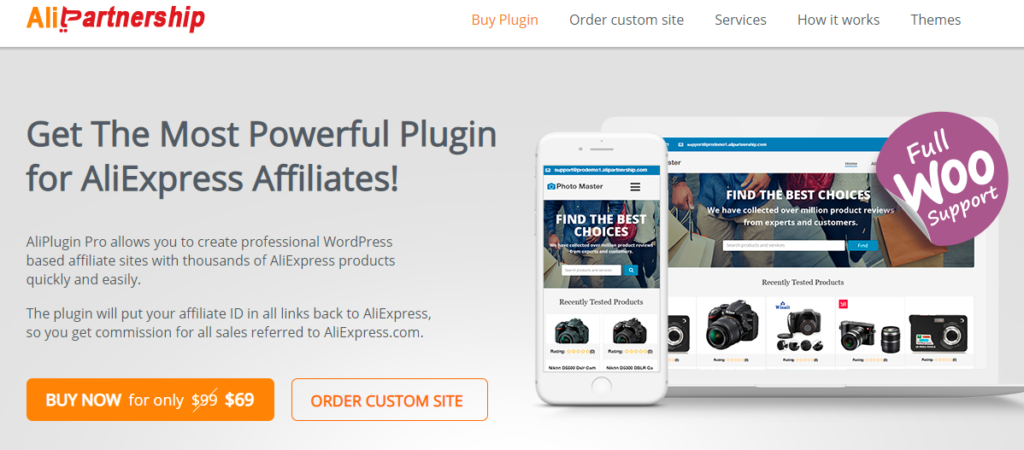
AliExpress Affiliate Plugin (AliPlugin) is a WordPress plugin developed by the AliPartnership. This plugin makes it easier for all the affiliates to add their links to their blogs and stores.

It lets you import your desired products and put them up for sale in your own store. You can also configure the product in a way that it automatically adds your referral link to all the AliExpress product links on the website.

So, if you want to earn money from the AliExpress affiliate program then using the AliPlugin is going to help make it easier for you. This plugin automates most of the simple tasks for you so you can focus on marketing and promotion of the products.

The AliPlugin costs $69 as a one-off payment and it’s definitely worth the money with all its features.

AliExpress Affiliate Program Commission Rates

One thing that discourages many people from joining different affiliate programs is the relatively low rate of commissions. For example, Amazon affiliate commission ranges from 1% to 10%, but 4% is the usual rate you get.  

The commission rates for AliExpress tarts from a generous 8.5% and go up to 10%. Besides, from time to time AliExpress offers an additional commission for new users which is around 6%.

Payment Method

One thing that can be considered a downside of AliExpress affiliate program is that they only pay via International Wire Transfer and the minimum withdrawal amount if $16 since $15 is the processing fee.

Earn Money with AliExpress Affiliate Program

 Today, we are going to take a look at the AliExpress affiliate program and see how it works. It’s an added bonus for dropshippers who can earn an 8% on top of their already set profit margins with AliExpress dropshipping.

So, check out this article to learn everything you want to know about the AliExpress affiliate program and see how you can make money with it.


What is AliExpress Affiliate?

AliExpress affiliate is the same thing as any other affiliate program. You are provided with a special link to AliExpress products and you can start promoting this link to earn a commission on each product that’s sold.

The rates are varying depending on the types of products. Some products even pay as high as 50% of the commission on each sale. So, you can make a killing revenue with this program.

Pros

  • AliExpress affiliate offers a minimum of 8.5% commission on a sale.
  • AliExpress cookies last 30 days.
  • AliExpress ships worldwide.

Cons

  • Shipping takes a long time.
  • Affiliate reporting takes 2-3 days to update.
  • AliExpress isn’t as trusted as Amazon, eBay.

Why Choose Aliexpress Affiliate Program?

Aliexpress affiliate program is an ultimate revenue-generating machine for marketers. AliExpress paid out over $100000 per month with top sellers making up to $20000 every month in affiliate commisions.

How to sign up for AliExpress Affiliate?

Signing up for an AliExpress affiliate is pretty easy. It takes just a few minutes to get yourself an affiliate account on AliExpress and start selling products to earn a commission.

Just head over to the portal.aliexpress.com then click Register and create an account.

Now, you have an affiliate account on AliExpress and you can start promoting products on your website, blog, social media profile, or anywhere you want. AliExpress will provide you with an API that you can use to promote the products. Each sale that is generated from your unique affiliate link will earn you a commission.

AliExpress Affiliate Plugin

AliExpress Affiliate Plugin (AliPlugin) is a WordPress plugin developed by the AliPartnership. This plugin makes it easier for all the affiliates to add their links to their blogs and stores.

It lets you import your desired products and put them up for sale in your own store. You can also configure the product in a way that it automatically adds your referral link to all the AliExpress product links on the website.

So, if you want to earn money from the AliExpress affiliate program then using the AliPlugin is going to help make it easier for you. This plugin automates most of the simple tasks for you so you can focus on marketing and promotion of the products.

The AliPlugin costs $69 as a one-off payment and it’s definitely worth the money with all its features.

AliExpress Affiliate Program Commission Rates

One thing that discourages many people from joining different affiliate programs is the relatively low rate of commissions. For example, Amazon affiliate commission ranges from 1% to 10%, but 4% is the usual rate you get.  

The commission rates for AliExpress tarts from a generous 8.5% and go up to 10%. Besides, from time to time AliExpress offers an additional commission for new users which is around 6%.

Payment Method

One thing that can be considered a downside of AliExpress affiliate program is that they only pay via International Wire Transfer and the minimum withdrawal amount if $16 since $15 is the processing fee.

Posted at December 19, 2020 |  by Online Ustaad
© 2013 OU Free Video Tutorials. All rights reserved
back to top