All Stories

Sunday, December 27, 2020

Image

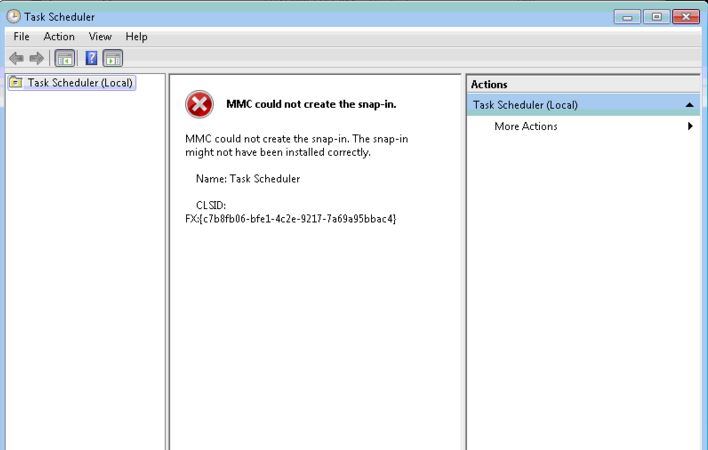
Microsoft Management Console (MMC) is a built-in feature in Windows operating system that lets you manage snap-in on the go. Snap-ins are basic component of a console. Sometimes, snap-ins may not work properly, especially if the registry configuration of a snap-in is broken. If you're going to look on the error message, you'll notice the CLSID:FX:{c7b8fb06-bfe1-4c2e-9217-7a69a95bbac4} which can help us investigate and isolate the issue. That said, you may need to modify the Windows registry.

Disclaimer: Serious problems might occur if you modify the registry incorrectly by using Registry editor or by using another method. These problems might require that you reinstall the operating system, and Microsoft cannot guarantee that it can be solved. Modify the registry at your own risk.

If you want to proceed, follow these steps to troubleshoot your the issue with MMC.

Press the Windows key + R on your keyboard, then type in regedit.

In the left pane, navigate to this location: "HKEY_LOCAL_MACHINE\SOFTWARE\Microsoft\MMC\SnapIns\FX:{c7b8fb06-bfe1-4c2e-9217-7a69a95bbac4}"

Right-click on the folder, then click Export. (This will let you backup the registry key into .reg file)

Right-click onto it again, then click Delete.

Click Yes when the confirmation box appears.

Close the Windows Registry, and restart your computer.

After restarting your computer, Windows should automatically generate the required registry configuration for the Task Scheduler and solves the problem.


How to fix MMC could not create the snap-in while opening task scheduler?

Image

Microsoft Management Console (MMC) is a built-in feature in Windows operating system that lets you manage snap-in on the go. Snap-ins are basic component of a console. Sometimes, snap-ins may not work properly, especially if the registry configuration of a snap-in is broken. If you're going to look on the error message, you'll notice the CLSID:FX:{c7b8fb06-bfe1-4c2e-9217-7a69a95bbac4} which can help us investigate and isolate the issue. That said, you may need to modify the Windows registry.

Disclaimer: Serious problems might occur if you modify the registry incorrectly by using Registry editor or by using another method. These problems might require that you reinstall the operating system, and Microsoft cannot guarantee that it can be solved. Modify the registry at your own risk.

If you want to proceed, follow these steps to troubleshoot your the issue with MMC.

Press the Windows key + R on your keyboard, then type in regedit.

In the left pane, navigate to this location: "HKEY_LOCAL_MACHINE\SOFTWARE\Microsoft\MMC\SnapIns\FX:{c7b8fb06-bfe1-4c2e-9217-7a69a95bbac4}"

Right-click on the folder, then click Export. (This will let you backup the registry key into .reg file)

Right-click onto it again, then click Delete.

Click Yes when the confirmation box appears.

Close the Windows Registry, and restart your computer.

After restarting your computer, Windows should automatically generate the required registry configuration for the Task Scheduler and solves the problem.


Posted at December 27, 2020 |  by Online Ustaad


Step.1:

  • Make a file named fullyautodial.bat
  • Right click and select edit.
  • Put the following inside it: rasdial connection nameusername password
  • Connection name = the connection you want to auto connect
  • Username = your username for this network.
  • password = your password for this network


Step. 2:

    Complete Task Management with settings.


Thanks for Visit. 😃


How to Create a Fully Automatic dialup PPPoE Internet Connection in Windows 8/10?


Step.1:

  • Make a file named fullyautodial.bat
  • Right click and select edit.
  • Put the following inside it: rasdial connection nameusername password
  • Connection name = the connection you want to auto connect
  • Username = your username for this network.
  • password = your password for this network


Step. 2:

    Complete Task Management with settings.


Thanks for Visit. 😃


Posted at December 27, 2020 |  by Online Ustaad

Thursday, December 24, 2020

It can be a frustrating experience when you find your Gmail account is no longer active. Having your Gmail account disabled means losing access to the products by Google that were linked. There are several reasons why your account may have been ended that are mostly due to the Terms of Service policies by Google itself. So, if you have violated one more of the polices either intentionally or not, you can find yourself with a disabled Gmail account.

Adding to the frustration is that Google will often disable the account with no warning. However, the good news is that there are simple methods for getting your account back online.

get disabled gmail account back

Gmail Account Temporarily Disabled

This is generally the easiest to overcome as Google believes that your account may be compromised. To rectify the situation, you will be asked to provide your mobile number or recover email identification. If you do either, they will send you a text message that will allow you to access your account quickly. You will need to do so within a 48-hour period otherwise it will become more difficult to get back your account.

Gmail Account Disabled Due To Perceived ToS Violation

If your Gmail account disabled included a terms of service (ToS) violation warning, then you will need to fill out their contact form so the process of getting your Gmail account back can begin. You should read the ToS thoroughly so that the violation will not happen again and provide the email address. If you do not get a response, repeat the step every two days until you do.

gmail account disabled
Gmail account disabled - Google contact form screenshot

Once they have responded, the next step should be to get your Gmail back so that you can gain automatic access to all the Google products including AdSense. You can also visit the help forum where you can open a 'Gmail account disabled' topic. Just focus on the Gmail account itself first as that is the key to the rest of your Google services. You'll want to discuss the issues that you are facing and why this needs to be resolved as quickly as possible. If the Top Contributor pings your thread to the staff at Google, then you should expect your account to be back online in 48 hours or two business days.

Gmail Account Disabled Due To Serious ToS Violations

If the Gmail account disabled was due to a serious violation of the Terms of Service agreement, as well as the Google policies that oversee your account, then you will have considerable difficulty in getting your account back. Such violations would include your AdSense account being involved in click fraud, for example. Serious violations that are clear will make it virtually impossible for your account to be restored.

If what happened was not considered a serious violation, then you should be able to get your account up and running within 24 to 48 hours depending on the circumstances. It pays however, to keep all your important data and information outside of your Google accounts in case of getting a Gmail account disabled result. By protecting yourself, the impact will be easier to handle until you can get your account back online.
How to Get a Disabled Gmail Account Back

It can be a frustrating experience when you find your Gmail account is no longer active. Having your Gmail account disabled means losing access to the products by Google that were linked. There are several reasons why your account may have been ended that are mostly due to the Terms of Service policies by Google itself. So, if you have violated one more of the polices either intentionally or not, you can find yourself with a disabled Gmail account.

Adding to the frustration is that Google will often disable the account with no warning. However, the good news is that there are simple methods for getting your account back online.

get disabled gmail account back

Gmail Account Temporarily Disabled

This is generally the easiest to overcome as Google believes that your account may be compromised. To rectify the situation, you will be asked to provide your mobile number or recover email identification. If you do either, they will send you a text message that will allow you to access your account quickly. You will need to do so within a 48-hour period otherwise it will become more difficult to get back your account.

Gmail Account Disabled Due To Perceived ToS Violation

If your Gmail account disabled included a terms of service (ToS) violation warning, then you will need to fill out their contact form so the process of getting your Gmail account back can begin. You should read the ToS thoroughly so that the violation will not happen again and provide the email address. If you do not get a response, repeat the step every two days until you do.

gmail account disabled
Gmail account disabled - Google contact form screenshot

Once they have responded, the next step should be to get your Gmail back so that you can gain automatic access to all the Google products including AdSense. You can also visit the help forum where you can open a 'Gmail account disabled' topic. Just focus on the Gmail account itself first as that is the key to the rest of your Google services. You'll want to discuss the issues that you are facing and why this needs to be resolved as quickly as possible. If the Top Contributor pings your thread to the staff at Google, then you should expect your account to be back online in 48 hours or two business days.

Gmail Account Disabled Due To Serious ToS Violations

If the Gmail account disabled was due to a serious violation of the Terms of Service agreement, as well as the Google policies that oversee your account, then you will have considerable difficulty in getting your account back. Such violations would include your AdSense account being involved in click fraud, for example. Serious violations that are clear will make it virtually impossible for your account to be restored.

If what happened was not considered a serious violation, then you should be able to get your account up and running within 24 to 48 hours depending on the circumstances. It pays however, to keep all your important data and information outside of your Google accounts in case of getting a Gmail account disabled result. By protecting yourself, the impact will be easier to handle until you can get your account back online.

Posted at December 24, 2020 |  by Online Ustaad

Monday, November 24, 2014

Learning English has become a necessity nowadays. Whether it is being taught at school level, college or university level, we all have to become perfect in this language. Why? The answer is quite simple because without English the survival of an individual in the tech and scientific world is quite impossible. If you are worried about how to learn English online in Urdu then not to worry there are plenty of websites and other sources to make your dreams of learning English in Urdu come true.
However, a point is to be noted here that there is no specific website at the moment on the internet to learn English completely in Urdu, but you can try out different methods to improve your English online. Which is being described in this course. We are also working to create an English course for all of you in Urdu.
learn english in urdu

Why to learn English in Urdu?

It is quite simple to say that many of us do not understand English language. Even the grammatical or simple to understand terminologies are not being understood by us in English. This is because the format and writing styles and even the spelling distinction is somewhat complicated to understand for the people who are totally unaware of this language. But English has become a part of our lives and we can not survive in any professional field or walk of life, especially in the world of internet without learning English.
If you feel that you won’t be able to learn English other than in your native language Urdu, then its time for you to search the websites, online tutorials and audio video sources which can teach you English in Urdu.

Tips to learn English in Urdu:

The first and most important thing you need to be informed is to make your mind to work hard while learning English. I know initially it would take you a lot of time and efforts for learning English language, but believe me once an Urdu tutorial is made available to you, it won’t be that tough for you any more.
Secondly, you have to be assured that a Pakistani tutorial or video source is made available for the purpose of learning English in Urdu. There are a lot of people and companies in the local market which prepare easy to understand and fully featured English language tutorials. Their core purpose is to make the local people understand the significance of English language and how to learn it efficiently in an Urdu version.
Take keen interest in learning English, don’t ignore the instructions and home work. If you remain consistent then in no way you would find any trouble in learning English. Just follow the step by step guides and instructions given in the Urdu tutorials, so that your practice and continuous efforts lead you achieve the goal.

Benefits of learning English in Urdu:

The local companies and tutorial creators develop different English language tutorials in a way that the users find them to be informative and easy to understand. Their purpose is to learn better grammar, speaking, writing, reading and listening skills of English. If you are lucky to have obtained a tutorial in Urdu, so it wouldn’t take you a long to learn English. There are so many benefits of learning English in Urdu such as;
  • English is an international language and by learning it you would be able to cope up the international standards and demands and get endless success in your professional life.
  • Urdu based tutorials would make it easy for you to learn each and every step of English language. The understanding of English grammar, spoken and writing skills along with reading abilities would make it easy for you to face the challenges of today’s world.
  • By learning English in Urdu, you would find it to be no problem to grasp the attention of international clients towards your business.
  • It would benefit you in another way that you would be able to become a creative and self esteemed individual and try your best to grow your business or work at international level.
Some websites you can learn English in Urdu online: 
P.S: 
If you know any website which provides learning resources to Learn English in Urdu then please share them in the comment sections, so students can get benefit of it. Thanks

How to learn English online in Urdu?

Learning English has become a necessity nowadays. Whether it is being taught at school level, college or university level, we all have to become perfect in this language. Why? The answer is quite simple because without English the survival of an individual in the tech and scientific world is quite impossible. If you are worried about how to learn English online in Urdu then not to worry there are plenty of websites and other sources to make your dreams of learning English in Urdu come true.
However, a point is to be noted here that there is no specific website at the moment on the internet to learn English completely in Urdu, but you can try out different methods to improve your English online. Which is being described in this course. We are also working to create an English course for all of you in Urdu.
learn english in urdu

Why to learn English in Urdu?

It is quite simple to say that many of us do not understand English language. Even the grammatical or simple to understand terminologies are not being understood by us in English. This is because the format and writing styles and even the spelling distinction is somewhat complicated to understand for the people who are totally unaware of this language. But English has become a part of our lives and we can not survive in any professional field or walk of life, especially in the world of internet without learning English.
If you feel that you won’t be able to learn English other than in your native language Urdu, then its time for you to search the websites, online tutorials and audio video sources which can teach you English in Urdu.

Tips to learn English in Urdu:

The first and most important thing you need to be informed is to make your mind to work hard while learning English. I know initially it would take you a lot of time and efforts for learning English language, but believe me once an Urdu tutorial is made available to you, it won’t be that tough for you any more.
Secondly, you have to be assured that a Pakistani tutorial or video source is made available for the purpose of learning English in Urdu. There are a lot of people and companies in the local market which prepare easy to understand and fully featured English language tutorials. Their core purpose is to make the local people understand the significance of English language and how to learn it efficiently in an Urdu version.
Take keen interest in learning English, don’t ignore the instructions and home work. If you remain consistent then in no way you would find any trouble in learning English. Just follow the step by step guides and instructions given in the Urdu tutorials, so that your practice and continuous efforts lead you achieve the goal.

Benefits of learning English in Urdu:

The local companies and tutorial creators develop different English language tutorials in a way that the users find them to be informative and easy to understand. Their purpose is to learn better grammar, speaking, writing, reading and listening skills of English. If you are lucky to have obtained a tutorial in Urdu, so it wouldn’t take you a long to learn English. There are so many benefits of learning English in Urdu such as;
  • English is an international language and by learning it you would be able to cope up the international standards and demands and get endless success in your professional life.
  • Urdu based tutorials would make it easy for you to learn each and every step of English language. The understanding of English grammar, spoken and writing skills along with reading abilities would make it easy for you to face the challenges of today’s world.
  • By learning English in Urdu, you would find it to be no problem to grasp the attention of international clients towards your business.
  • It would benefit you in another way that you would be able to become a creative and self esteemed individual and try your best to grow your business or work at international level.
Some websites you can learn English in Urdu online: 
P.S: 
If you know any website which provides learning resources to Learn English in Urdu then please share them in the comment sections, so students can get benefit of it. Thanks

Posted at November 24, 2014 |  by Online Ustaad
© 2013 OU Free Video Tutorials. All rights reserved
back to top